
A system to manage tasks can be electronic, paper, or a combination or hybrid sytem. Over time I have come to lean more upon the electronic option, and Keep It Super Simple, relying mainly on various Google apps like Docs for lists and Keep for notes, projects and reminders.
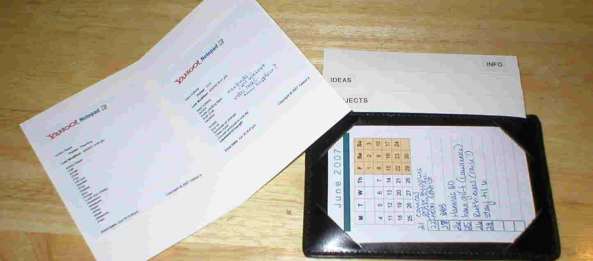
In the past, I relied more on paper, and devised this GTD mini system that tucks into a leather index card holder, using mini-folders made from notecards. I printed monthly calendars from Calendarsquick.com that could go in the top slot of the index card holder, inside a cut down project folder for portection. These minimal elements were easy to carry around. Getting Things Done (or GTD for short) is a book by David Allen and a popular time management system, although I prefer different terminology.
The 4 mini-folders:
- Next steps/incoming (next actions)
- Projects
- Ideas (someday/maybe)
- Information
Inside these are lists printed out from my Google docs. (any list application would work for this) This is a great capture/collection tool, as well as providing the information I need for planning on the fly. It works well in tandem with the desk paper planner for the weekly review and lists on the computer.
For awhile, I used a Mead Pocket Planner, with folded free printable set of a weekly planning form plus five daily planning forms (pdf) tucked inside the front of the plastic cover, and folded goal info tucked inside the back of the plastic cover. Nine productivity information cards in one pdf file can be found here.
Please explore more Free Tools!
- The leather index card holder is still handy, with blank index cards in the pocket, and my to-do list on the other side, inside a plastic project file.

I seek to create order from the chaos of complex information. Join me at the Daily PlanIt to gain insights, inspiration, and information to increase skills for a better life. I unlock the power of teaching reading with phonics in the pursuit of literacy at www.phonicspow.com. In my spare time I explore books and movies, often choosing titles available on both screen and page.


 Daily PlanIt
Looks like you’ve got a good system going for you – well done!
your “Daily Review” link links to your “Incoming Tasks” Sheet. FYI.
Thanks for the heads-up, Gabe! should be fixed now…gosh it’s tough to be organized 🙂
[…] The portable gtd mini system includes nine information cards in one pdf […]
I like it. It looks both functional and portable.
Thanks for the post. I recommend to clients they carry the following:
o calendar
o actions list
o [waiting for]
o [projects]
o capture tool (i.e., blank pad/cards)
o Action Support folder (for actions needing paper that doesn’t have a dedicated folder)
o Read/Review folder (for those “between” moments – only for FYI reading, BTW)
o relevant project folders
[…] high enough.“ Rosemary Honn: “I have become more effective since implementing the portable GTD mini-system, and now have my frequently changing lists in Google docs and print them out as part of the weekly […]
[…] Posted on November 6, 2008 by dailyplanit I have been striving to improve the portable mini gtd system. The little files from notecards work fine but are a bit bulky and a little worn looking. I was […]
very good site
[…] Comments The portable gtd mini system « Daily PlanIt on GTD EssentialsThe portable gtd mini system « Daily PlanIt on […]
[…] Portable GTD mini system, Calendar & Tickler File […]
[…] of a weekly planning form plus five daily planning forms (pdf). I previously used these with the portable gtd mini system, and a Mead pocket […]
[…] The portable gtd mini system […]
[…] and GTD, The portable gtd mini system, GTD made […]
[…] For GTD practitioners: The GTD mini system […]
I’m sure you know about google keep by now. love it.
Oh, yes, Carl, I love google apps! I now use a google based system I call the Keep It Super Simple System. https://dailyplanit.com/2015/03/02/the-daily-planit-keep-it-super-simple-k-i-s-s-system-for-productivity/