
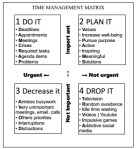
Choosing which things are the most important to work on is a vital skill for productivity. The time management matrix is a well known method for setting priorities for day-to-day planning. To make a plan for the day, look at…
Choosing which things are the most important to work on is a vital skill for productivity. The time management matrix is a well known method for setting priorities for day-to-day planning. To make a plan for the day, look at…
Terrific post by Lisa Peake on the dreaded inbox via LifeDev.
System review see A Look at My System and Workspace for an update How I handle: Calendar & Email: Yahoo. maybe someday gmail. Ideas: At home-clipboard. At night-bedside notebook + pen that lights up. At work-project folders. Master List: index…
When you put repeating or recurring tasks on autopilot, you free your mind for more important matters. We all face routine tasks to maintain our home, and most jobs involve regular duties that must be completed. It’s important to have…
I was a bit surprised when I read Merlin Mann’s post at 43folders about his very simple folder system for email. I have ten folders and it still doesn’t seem like enough. Then I read his notes about the latest…
Oh, the paper possibilities! You can pile, you can procrastinate, you can create problems for yourself, or you can prepare a system. The 4 D’s of Productivity apply to paper management. They are: Do It Delegate It Delete It Delay…
Planning is Thinking, and the ability to plan is a skill that employers want. Learn more about Daily Planning and create a Weekly Plan during the Weekly Review to see how your week will look in a week view. For…
Stephanie Winston, author of “Getting Organized,” recommends keeping a master list of everything you need to do. This is a running list of things you need to remember, discuss, plan, solve, errands to run, calls to make, etc. Low tech:…
Follow-up systems can handle: deferred actions task start and due dates meeting materials phone call-backs bill paying tickets tracking projects delegated tasks Methods Simplest: Mark a calendar and hold papers in a “Pending” file-idea from Stephanie Winston. Simple: Tickler file…


 Daily PlanIt