Day Out

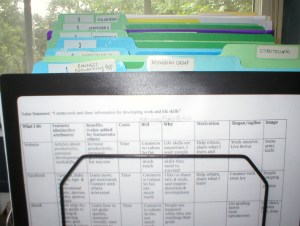
As a reward for the progress I’ve been making on the garage, I had a day out of shopping. Half Price Books is one of my favorite places to go, and there I found a book called “Productivity Power” by Jim Temme. It has a neat chart comparing the similarities of projects and goals, and an interesting take on priority setting. I found a wonderful hanger for slacks at Target that holds five pairs of pants on swing arms-what an improvement over the ones I’ve been using! A stop at Office Depot for project files (a great tool for keeping papers together) led to the unexpected discovery of a desk chair that was half price too! I’ve been wanting a new one for awhile, as the one I was using was too large and just didn’t fit well. Since I spend a lot of time in it, I think it will pay off to have one that is more comfortable! It’s my favorite new productivity tool.

Posted in productivity

Time Wasters and Solutions

Problem: Interruptions
Solutions: Create blocks of time with no calls or visitors. Position your desk away from the door. Set a time limit on meetings. Cue ending (“Before I get back to this project, is there anything else I can help you with?”) Schedule a meeting at a better time. Going to the other person’s office gives you more control over leaving. Stand up to keep meetings short. Find a place where you can work uninterrupted.

Problem: Distractions
Solutions: Focus and follow through. Once a task is begun, momentum can keep you going. With each interruption time is lost. If you must leave a job in the middle, leave it at a point where it will be easy to pick up again. Concentration is the ability to focus our attention on the task at hand. Eliminate all distractions and interruptions as much as possible. Take breaks when fatigue interferes. Turn boring tasks into challenges by setting goals and determining rewards. Vary routine tasks.

Problem: The Telephone
Solutions: Batch phone calls. Call at a time you are likely to catch the person at their desk, but right before lunch or quitting time will keep it quick. Stick to the point. Set a time limit and a timer. Have simple tasks available to work on while on the phone such as clipping articles or scanning catalogs.

Problem: Taking on too many projects
Solution: Learn how to say no.

Problem: Lost papers or items
Solutions: Learn paper management and use organizational tools.

Problem: Procrastination
Solutions: Break down large projects into smaller steps. Overcome perfectionism. Overcome inertia by taking baby steps. Have routine opening moves for regular tasks. Apply self-discipline to overcome the tendency to avoid unpleasant tasks. Realize that ignored problems usually do not resolve themselves.

Problem: Waiting
Solutions: Be prepared with paper and pen and reading material. More handy items–envelopes and stamps, highlighter and sticky notes, a calculator. Make lists, review a report, plan.

Problem: Ineffective time use/crisis mode
Solutions: Plan daily, set goals, and assign priorities. Think proactively, anticipating possible problems. Allow for emergencies. Use small chunks of time. Things you can do in five minutes: make an appointment, water plants, write a short note. In ten minutes: sort mail, scan an article, straighten your desk, make a brief phone call, clean out a file.

Problem: Overwork
Solutions: Delegation. Utilize peak time. Take breaks and time for self, balancing work and play. Make conscious decisions about the best use of your time.

Problem: Re-inventing the wheel
Solutions: Use checklists for repeating tasks, an outline of the steps that need to be accomplished. Set up a tickler system for follow-up.

See also: Email management & Sticky Wiki Time Wasters

Tagged with:
Posted in productivity

Get Organized with Home Helpers

Time management resources usually fall into one of two categories: Work Wonders or Home Helpers. Here are a few Home Helper Resources I’ve discovered.

I’ve been reading the book, “1000 Best Quick and Easy Organizing Secrets.”by Jamie Novak. There’s lots of great ideas, and at the back are Simple Sevens for Success: 7 favorite tools, 7 ways to start small…

Websites

Laura Stack, the Productivity Pro has helpful content. So does Smead.
Messie’s Anonymous by founder Sandra Felton, and Flylady.net are both helpful sites.  Real Simple magazine is great, and also has a website with lots of neat information.Getorganizednow.com and  Organized Home are wonderful websites too.

enjoy the little things notebook

Photo by Miesha Renae Maiden on Pexels.com

Books
“The Organizing Sourcebook” by Kathy Waddill-nine strategies for organizing your life with real life examples from a professional organizer.

“Best Organizing Tips” by Stephanie Winston-great overall guide.

“Get Your Act Together” by Pam Young and Peggy Jones-a card system for keeping track of keeping house for sidetracked home executives. Also check out “The Messies Manual” by Sandra Felton,” and Confessions of a Happily Organized Family” by Deniece Schofield.

“Ready, Set, Organize” by Pipi Campbell Peterson-has helpful information about filing and storage.

“Let Go of Clutter” by Harriet Schecter-ideas to simplify. There are two articles by her at Soulful Living: From Chaos to Comfort and Shedding Sentimental Clutter.

“One Year to an Organized Life” by Regina Leeds-breaks a big project into doable steps.
shopping cartLinks to my favorite books and products for productivity and personal development at The Daily PlanIt Amazon Store

See also:

Don’t miss the Home Helpers section of the Free Tools page at the Daily PlanIt.

Posted in Books, productivity

Household Records File

Adventures in Home Ownership

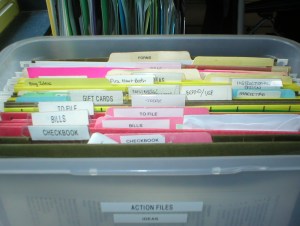
The good news is I am on a clutter busting roll! The bad news is I’m exhausted…whew. I have just enough energy to share my mistakes that you may learn from them. It all started when a VCR of fairly recent origin ate a tape. I wasn’t sure where I had put the book for it, let alone the receipt. I had one huge file labeled “warranties” that I’ve been throwing things into (when I remembered to) for awhile. Others had made their way to various locations around the house. I was inspired to make separate hanging files for all major appliances and label them: dishwasher, refrigerator, stove, washer and dryer, air conditioner, etc. Then I made a list with the information: date purchased, where, price, brand, etc. Next I will make more files divided by location: small appliances-kitchen, electronics and so on.

So from now on, here’s the plan every time I purchase something over $20.

  • Right away, make a file for the book.
  • Write the date & where purchased on the front cover and staple the receipt inside the back cover.
  • When something breaks, or is otherwise no longer around, remember to take out the book and discard it.
  • Less expensive versions of some things can be more inclined to break sooner. Sometimes you get what you pay for.
  • When gifts are received that have a book, make a file for them too.
  • Some books may contain pages with information you may need for maintenance or operation. Make a copy of those to add to a Household Notebook. For example, instructions for a thermostat or for telephone functions.
  • Include a seasonal maintenance checklist in the Household Notebook.
  • Keep track of home repairs and improvements.

See also Files

Posted in information management

Quiet Leadership

Booknotes on “Quiet Leadership” by David Rock. (Affiliate link: I receive a small commission at no additional cost to you if you click through and make a purchase with an affiliate link. Thank you for your support!)

Pathways in our brains are formed as connections are made through our experiences. Attempts to change those pathways are difficult and often ineffective. A more effective way to improve performance is to create new connections. The best way to learn is to make connections yourself. To form new connections, focus on thinking and solutions. When new connections are made, we are excited by the possibilities in the aha moment. Grab onto that energy and follow-up with concrete ideas for actions.

If your advice is sought to solve problems, ask others questions about their thinking to help them come up with solutions.

  • How important is this to you?
  • How often have you been thinking about this?
  • How do you feel about your thoughts on this?
  • Do you know what you need to do?
  • What are the possibilities?
  • What actions can you take?
  • What have you learned?

See also The Power is in the Focus

Posted in Books, work skills

Click

grayscale photo of remote control near eyeglasses

Photo by Steve Johnson on Pexels.com

A universal remote that actually controls life is the premise for the Adam Sandler movie, “Click.” After going to the “beyond” department of Bed, Bath and Beyond, he thinks he’s found a wonderful tool. However, the more he attempts to control life, the more out-of-control his life becomes. There is plenty of trademark Adam Sandler humor (i.e. usually rude & crude!) and some funny moments like when he discovers he can turn down the dog’s barking. But it actually makes a serious point that if we fast-forward through the tough times, we miss a lot of important stuff. And how vital it is that our actions reflect what we say we believe.

Posted in personal development

Why We Procrastinate

I have tackled a big project: cleaning the garage. It’s so easy to find almost anything I’d rather do, because I *really* don’t want to do it. I’d even rather do exercises, and that’s saying something for me. I’m trying to focus on the vision of a beautifully organized space, and break down the job into smaller parts. Even so, this is a tough one.

The Require/Desire Grid from “The Organizing Sourcebook” by Kathy Waddill:

RequireDesireGrid

My riff on needs vs. wants, love vs. hate:

NeedWantLoveHateGrid
These will vary for each person, and may overlap a bit. But one thing you can count on: the things you really hate to do but which need to be done are going to require healthy doses of motivation, all the techniques to overcome procrastination, and hefty rewards to accomplish! They will drain your energy batteries. The ones you enjoy doing can be rewarding in themselves and will recharge your batteries. It may be a good idea to alternate between these two extremes.

Task selection factors

from the book “Manage Your Time, Your Work, Yourself” by Merrill E. and Donna N. Douglass:

· Demands of others
· Closeness of deadlines
· Amount of time available
· Degree of enjoyment
· Order of arrival
· Degree of familiarity

The authors say we tend to do first the smallest, easiest, most interesting tasks first, although they may not be the high priority tasks that contribute toward meeting goals.

Related:

Posted in productivity

Discoveries of the Day

Reading Orbit Now! Troy Worman’s Weblog (don’t wait for permission to succeed) led me to…

Genuine Curiousity -Always on the lookout for new things to learn. Has some great stuff on GTD. This led to…

ToDoOrElse -yup. more great stuff on GTD.

which led to…

Bobby Anderson’s post on GTD for Emotions. Totally cool idea.

Must stop…need sleep.

Posted in productivity

Dealing with Automated Telephone Hell

“Businesses choose effectiveness over efficiency to listen to customers.”

Wouldn’t you like to see that headline?

Do businesses really believe that automated telephone systems equals effective communication with customers? Hard to imagine. Who has not experienced the telephone hell of being runaround in endless circles, the clock ticking away while listening to unhelpful machine menus with the problem no closer to being solved? It’s frustrating in the extreme. If you are stuck in this situation, think of it as the perfect opportunity to practice persistence and patience. If that fails, check the gethuman 500 database to see if the company you are dealing with is listed.

Posted in Ideas That Work

Food is a Four Letter Word

Recipe for Menu Planning

No matter how busy you are, you’ve got to eat!

1. Organize Recipes. Favorite recipe websites are: AllRecipes.com and Taste of Home.

RecipeCards

Blank Recipe Card Template in Simply Dinner: the Game Plan

I use the resources in my eBook “Simply Dinner: the Game Plan” to organize my recipes and plan meals. Check out Simply Dinner: the Game Plan! It has a blank recipe card template with four 3×5 cards on one page. Not to mention enough recipes designed for a low-carbohydrate diet for a month of menus. No fancy ingredients here, and please note they are not vegetarian.

Before I created this, I used a Google Doc template to keep my recipes on my computer and smartphone. To find it, go to templates at Google Docs,  search “recipes” and choose the template by Mikelle Auman Williams. This template has tabs along the bottom for different categories of recipes. To print them two to a page I needed to insert a row at the bottom of each recipe.

2. Plan meals as part of your weekly planning. I like the Vertex42 Weekly Meal Planner. Consider sales and seasonal foods, nutrition, variety, visual appeal and textures. When there is little time for cooking, use crockpots, freezer meals, and make-ahead mixes. After planning, make a grocery list of items you need to buy. If you have a smart phone, consider apps: Fooducate

Plan A: Download a blank monthly calendar from Vertex42.com and fill in a month of menus. Here is mine (pdf) And my now low-carb version (pdf)

Plan B: Use daily themes – see Eating For One

Plan C: List some of your favorite meal plans on cards. Include a main dish, side dishes, and dessert. Make about 10-15 cards, on the other side list ingredients needed for a shopping list.
Example:

  • Pork Chops
  • Sour cream scalloped potatoes
  • Green Beans
  • Rolls
  • Apple Crisp

Plan D: Make separate lists of main dishes, side dishes, and desserts, then randomly select an item from each. You could even use a dart-board for this! Eatingwell.com provides healthier alternatives too.

menu

Plan E: Eat out! Keep a list of favorite restaurants.

UPDATE: For a fun & simple system for meal planning, check out my eBook with recipes designed for a low-carb diet, Simply Dinner: the Game Plan!

See also: Refrigerator Magnets from The Red Chair Blog. and more ideas here. The Menu Planning post at Titus2Homemaker is very helpful too.

FORMS: planners from Vertex42.com.

Cookbooks: Taste of Home Most Requested Recipes, 400 Calorie Fix

Food Diaries: printable food diaries at Make Healthy Food Choices and Track Diet.

See also: Learning About a Low Carb Diet, Daily Themes, and Eating For One.

AWESOME: A Month of Menus is a 72 page printable pdf from Kansas State University complete with recipes, shopping lists, measures and substitutions! Everything you need is right there. Still more recipes are at Free Healthy Recipes from the National Heart, Lung & Blood Institute.

George Foreman Grill Recipes, and a 120 page ebook.

This is one of the weekly activities for a Year of Personal Development.

Posted in productivity
eBooks

Enter your email address to follow this blog and receive notifications of new posts by email.

Archives
Blog Stats
  • 744,083 hits