I didn’t really think it would happen. But Legal Andrew tagged me for the “5 things you didn’t know about me” meme. Sorry, I’m a little bit slow…This is really difficult, as I’ve got to have the dullest life imaginable! OK, here goes:
1. My first job was washing dishes at a beautiful camp in the Flint Hills. Maybe you know that already, but it’s my most interesting thing!
2. I’m basically positive but have a dark side. I see tragedy and sadness and sometimes it gets to me.
Thank you to Andrew, and to all the wonderful people I’ve had the chance to meet and learn from this year. Thank you to all who stop by. You’ve been a beautiful gift.
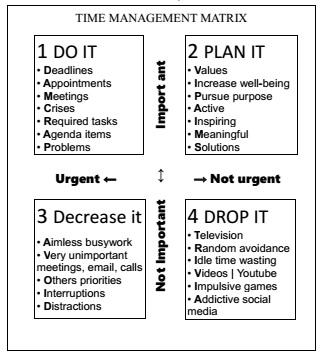
Choosing which things are the most important to work on is a vital skill for productivity. The time management matrix is a well known method for setting priorities for day-to-day planning. To make a plan for the day, look at your calendar and select a few items from your to do list. Start with the urgent DAM CRAP that must be done, then consider which VIP AIMS contribute the most impact and best leverage your strengths.
Choosing priorities in longer range purpose planning involves looking for activities that have a BIG impact and engage strengths. The Effect Priority Matrix at the Priority Flowchart takes a closer look at these factors when choosing value based goals for pursuing a mission and vision.
We will start with the Time Management Matrix, then cover other methods for setting priorities after that:
Sweet spot matrix – compares impact and effort
Most Important Tasks (MITs) – from Leo Babauta at Zen Habits
ABC method – A=MUST do, B=SHOULD do, C=COULD do
Return on Investment and Rocks – big rocks (things that matter most) first from Stephen R Covey
The 80/20 or Pareto Principle and Target values – your guiding principles
Look for Very Important Priorities with UNITE:
Urgent: start with any DAM CRAP that must be done: Deadlines, Appointments, and Meetings, Crises, Required routine tasks, Agenda items, or Problems (Time Management Matrix) These are often Unpleasant “frogs” that have to be done (Brian Tracy says to Hop to It!)
Notable VIP AIMS that are Important: VIP AIMS are vital to values, increase well-being, and pursue purpose – things like building relationships and taking steps toward goals – remember to include them!
Increase Impact with activities that create: bold change, impressive influence, or great movement (Effect Matrix)
Target STAR strengths to engage Skills, Talents, Abilities, and Result in flow. HIGH engagement activities will: Harness strengths, Ignite imagination, Grow and develop skills, and Have intrinsic rewards.
Effectively meet needs for Contribution, Connection, Competence, and Choice.
The time management matrix from the book “First Things First” by Stephen R Covey is a well-known tool to set priorities. It is sometimes called an Eisenhower Matrix.
Quadrant I (important and urgent): Start with the DAM CRAP: Deadlines, Appointments, Meetings, Crises, Required repeating tasks, recurring and routine tasks, Agenda items, or Problems – Do It!
Quadrant III (urgent but not important): AVOID Aimless busywork, Very unimportant meetings, emails, and calls, Others priorities, Interruptions, Distractions – Decrease It!
Quadrant IV (not urgent and not important): TRIVIA: Television, Random avoidance, Idle time wasters, Videos (TickTock, Youtube), Impulsive gaming, Addictive social media – Drop It!
1. Do It Now
Ask which tasks…
must be done right now?
will fit the amount of time available now?
will fit the amount of energy available now?
2. Plan It!
are VIP AIMS that are vital to values, increase well-being, or pursue purpose?
Your day has begun. How should you choose where to begin with your To Do List? A few more methods for choosing priorities:
Sweet spot matrix – compares impact and effort
Most Important Tasks (MITs) – from Leo Babauta at Zen Habits
ABC method – A=MUST do, B=SHOULD do, C=COULD do
Return on Investment and Rocks – big rocks (things that matter most) first from Stephen R Covey
The 80/20 or Pareto Principle, and Target values – your guiding principles
The Sweet Spotis the place where tasks have high impact and require low effort. They provide a quick win. Plan for tasks that have high impact but require high effort by breaking them down into smaller steps. Of course, some worthwhile goals do require effort and even pain and sacrifice. Remember the Economy of Goals which means that goals are more likely to be accomplished if the benefits outweigh the resources that are required to obtain it. [UPDATE: see the new Priority Flowchart post with the Effect Priority Matrix, which exchanges engagement for effort. Effort is included as a cost in considering Return on Investment]
Most Important Tasks (MITs) from blogger Leo Babauta at Zen Habits is the simplest way. Another simple method is The 1 – 3 – 5 Rule from the Muse: 1 big thing, 3 medium, 5 little.
The ABC method from Alan Lakein (or ABCDE from Brian Tracy):
A-important tasks that contribute to goals MUST do
B-moderately important SHOULD do
C-least important COULD do
Return on Investment. Weigh the time, energy, or other resources required vs. the benefits of accomplishment to decide whether it is an idea or task is worth doing. Julie Morgenstern’s Return on Investment considers: deadlines, estimated time, and steps to results. In the book “Wild Problems” by Russ Roberts, the author suggests going beyond consideration of costs vs. benefits to make decisions with the virtues of simplicity and becoming – thinking about what kind of person you want to become.
RESOURCES
Size – how big is it? How many steps are required? Are there many obstacles?
Time – how long will it take to complete? Is there a deadline? When to begin?
Energy – how much effort is needed? How much work will it be?
Access – does it require collaboration with other people? Tools or a workspace?
Money – how much will it cost?
RETURN
Gain – will it add growth, align with values and advance goals? increase efficiency or knowledge?
Revenue – will it generate a financial return?
Appeal – is it something you or others really desire?
Impact – will it make a large difference?
Needs met – will it add value by meeting needs?
Rocks – Stephen R Covey illustrates the importance of putting your big rocks (things that matter most) first in this video, (4:01) Big rocks include roles like family, work, community, etc.
Target Values
Perhaps one of the best ways to set priorities is to maintain a focus on the values that are your guiding principles with a value statement that clarifies what you do and why. Remember to include your goals and projects when it’s time to schedule tasks. A time audit shows how you actually are spending your time. Understand the value of time and plan to use it well.
The 80/20 rule (aka Pareto principle) – 80% of results come from 20% of actions.
Always use the time you have well. The Pareto Principle or 80/20 rule says that 80% of the output or results will come from 20% of the input or action. Jim Temme in the book “Productivity Power” says that we spend about 80 percent of our day working on job description activities (what I think of as repeating tasks) that yield only 20 percent results. The challenge is to use the remaining 20 percent of discretionary time on goal-related activities that yield 80 percent results. See more about the Pareto Principle at Measuring Productivity and the Pareto Principle Illustrated. Learn how to choose to say yes or no?
The Important can so easily get lost in the deluge of distractions in everyday life. Time squandered on the unimportant is lost forever, and no longer available for what matters most. Always Be Checking in with yourself if you are spending time on what you really think is important. Learn more about how to use time productively with the Time Management 101 tutorial.
GREAT priority tasks: Give high impact Requirements that are urgent Engage strengths Are important: VIPs = vital to values, increase happiness, and pursue purpose Target what really matters most
Once decisions have been made about selecting top priorities, it is Time to Act!
I spent an hour last night listening to an awesome webinar (slideshare here) featuring Jeffrey Schwartz (author of The Mind and the Brain) and David Rock (author of Quiet Leadership) as they discuss the neuroscience of leadership at strategy-business.com. It covered some very interesting ideas and I thought it was fascinating.
A couple of gems from it:
“A working definition of wisdom is prioritizing in ways that help you keep your eyes on the prize.”
We have the veto power to recognize distractions and focus our attention back on what’s important. Rather than think “focus, focus, focus” simply notice distractions and re-direct with “no, that’s not what I’m going to work on.”
Learn more about how to TEND to focus with Four Fantastic Tools for Focus. The Four Ps of positive shift are Power up, Pause, connect with People, and connect with Purpose. Focus is the power tool for Purpose. A tool to help with focus is a mission statement or value statement, sometimes called a Unique Selling Proposition (USP) or Unique Value Propostion (UVP).
The Next Action list is really a version of master list, that pulls together the next actions needed for all projects. If you like to see the actions listed with the projects, some kind of method is needed that automatically combines all the next actions into the master list and still enables you to view them in the context of the project. I read a post about this somewhere that I can’t find now, however it used tools I don’t have. 😦
Contexts are not very important to me. Whether at work or at home, I virtually always have access to a computer and a phone. Although I do have one page of home projects and another of work projects.
Mindsweep is a word that actually makes my brain freeze up. Of 4 ways to trigger ideas at GTD Portal,walking around appeals to me most.
When you put repeating or recurring tasks on autopilot, you free your mind for more important matters.
We all face routine tasks to maintain our home, and most jobs involve regular duties that must be completed. It’s important to have a method for them to pop up on your radar to deal with them, without cluttering up your to do list.
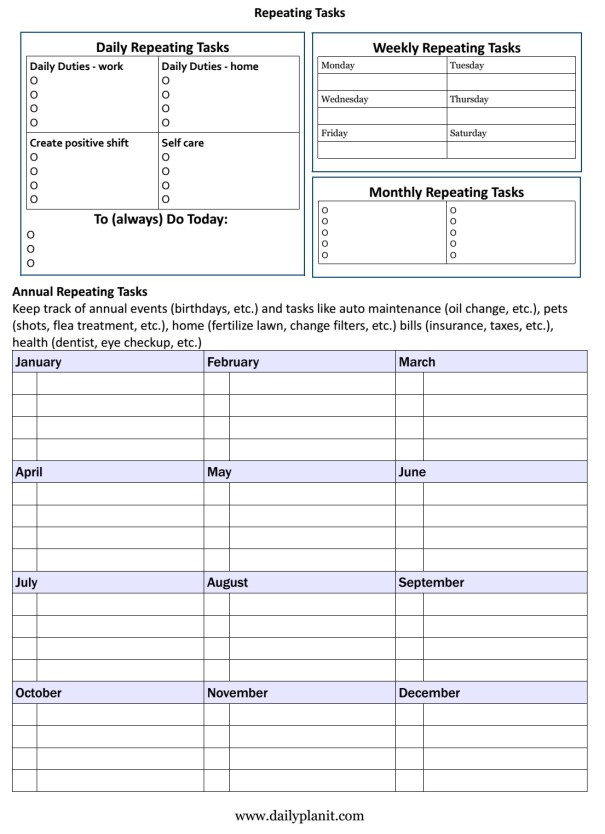
What are the tasks that you must accomplish on a regular basis at work and at home? Identify the repeating tasks that must be done on a daily, weekly, monthly, and yearly basis at home and work. You may want to include an estimate of the time it takes to complete the task, and note if the task is best performed at a certain time or place, if peak time or a tool is needed, etc.
Use a repeating task checklist: download a free one page form with daily, weekly, monthly and annual Repeating Tasks, or a Repeating Tasks Worksheet is available at the Daily PlanIt Shop. Another alternative is to use separate lists according to frequency:
DAILY
There are some things you may want to remember to always do today. Daily duties for home often include cleaning and cooking. Daily themes can help with these tasks. Job duties vary depending on the work you do. Include important stuff, like activities to create positive shift and self-care activities that have been shown to increase well-being. Sketch out daily repeating tasks for a daily routine with a Daily Plan Form or a Time Log.
WEEKLY
For home, weekly tasks may include menu planning, a weekly review, or focused cleaning on a different room each day of the week. You might have a goal of getting together with a friend once a week, or to save a certain amount of money each week. Examples of different goal frequencies are at Goal Master List. List weekly repeating tasks on a Weekly Repeating Tasks (pdf) form at or a Weekly Planner from Vertex42.com.
MONTHLY
Monthly repeating tasks may be financial, goals, or for work or home. This may include things like paying bills, filing papers, and backing up your computer. In Before you create a To-Do List, Michael Hyatt talks about making a Master Task List, which are the most important tasks that add value if you do them. These are often important, but not urgent, what I call VIP AIMS. Download a Monthly Repeating Tasks pdf to list monthly repeating tasks.
Keep track of annual events and tasks like birthdays, auto maintenance (change oil), pets (shots, flea treatment, etc.), home (fertilize lawn, change filters, etc.) financial (bills, insurance, taxes, etc.), health (dentist, eye checkup, etc.) Download the Annual Repeating Tasks pdf to list yearly repeating tasks, and check out the Annual Review Metrics form at An Annual Review.
Although we don’t control everything, this doesn’t mean we can’t set goals and work towards them. It does mean learning to accept that there will be obstacles and problems in life that can affect outcomes. We can rally our resources and do our best to shape life.
Resources:
What You Can Change and What You Can’t by Martin Seligman.
As I think about what I’ve been spending my time on lately, I’m reminded of Maslow’s hierarchy of needs. We must take care of those important survival needs before moving on up to higher things. Do you think I’ve been:
a. surviving winter
b. preparing for the upcoming holidays
c. improving training designs at work
d. all of the above
The answer is: d!
For one who is supposedly into planning, I wasn’t all that well prepared when a snowstorm hit. I think exposure to the Just in Time theory is partially to blame. Also the small size of my home which simply does not allow for huge stockpiles of supplies. However, there are certain things it’s good to have plenty of when you’re snowed in: coffee, milk, pet food, and so forth. The snow is melting now and it would be a good idea to give some more thought to this.
I try to keep things fairly simple for the holidays. Still, there are extra things that must be done, and these extra things just take some time. Thankfully, packages have been sent and cards (mostly) mailed now. I can almost relax and enjoy it now.
I’ve been developing a staff blog to communicate information to assist in training new employees and to share opportunities for learning. I think it’s got the potential to be helpful.