Discoveries of the Week

Speaking of productivity, Zen Habits has been very busy with some excellent posts! Not only is there a full version and a minimal version of Zen to Done, but also a list of Top 50 Productivity Blogs (including yours truly!) Checking them all out is now on my list of things to do!

I learned of a site that provides free book summaries called WikiSummaries. Whew, it’s been a busy week for sure!

Posted in productivity

Session Notes


Session notes from “Lifehacks and Hipsters and GTD, Oh My!”, 13 April 2007, KLA/KASL/KAECT TriConference


Introductions

Rhonda – State Library, member of National Association of Professional Organizers

Rosemary – Ottawa Library, blogs on planning & time management at dailyplanit.wordpress.com

What do attendees hope to learn?

What type of handheld to get:

* make sure you love it – borrow before you buy

* check reviews in PC mag, epinions.com, ask friends

* essentials – calendar, contacts list, to-do

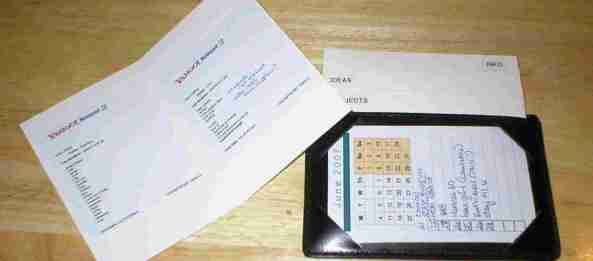
* no-tech alternative – hipster (index cards held together with binder clip) http://en.wikipedia.org/wiki/Hipster_PDA; templates for calendar, etc. at http://www.douglasjohnston.net/templates/

* modified hipster – punched cards (like old catalog cards) held together with a binder ring

How to handle piles on desk:

* set aside uninterrupted time to sort through all; file or toss anything no longer needed in prime space

* use vertical space – stepped dividers, horizontal letter sorters, pendaflex pilesmart

* some people like ‘stuff put away’, some people like ‘stuff in view’ for current projects

* be careful using color – what happens if you run out of a needed color? try inexpensive, like sticky dots or magic marker before expensive like folders

Timely access to both personal & work info:

* planning tool needs to be portable/accessible

* try online tool like yahoo or google calendar

How to deal with multiple deadlines:

* build timeline with intermediate steps

* display timeline/project list over desk

* if projects coming from several different sources, ask them to prioritize

Efficient ways of handling to-dos:

* have ‘to-do’ folder in e-mail client to get stuff out of inbox – check regularly

* handle either in large uninterrupted chunks of time or small bits –

set a timer – can do anything for 5 minutes – depends on working style

* do immediately if it takes <2 minutes (GTD)

* use low-energy time, like end of day to review

Setting priorities:

* urgent/important matrix

* like to do/need to do matrix

o like to/need to “gems”

o don’t like to/need to “toads” – eat first thing in the morning and nothing worse will happen all day

o like to/don’t need to “butterflies” – spend a lot of time chasing them

o don’t like to/don’t need to “gnats” – swat ’em!

* ‘need to do well’ vs ‘need to do quickly’

Handling e-mail (handout)

GTD:

o Book “Getting things done” by David Allen

major focus is on getting to-dos, projects, appointments, etc out of

head and into a tool (PDA, calendar, hipster, etc)

o flow chart at http://www.flickr.com/photos/koolpal/8872491/

Lifehacks – any little tricks that make life easier:

o fold under end of package tape

o even better – put paper clip under edge

o use dryer sheets to dust tops of books – dollar store package lasts all semester, pass out to kids 5 minutes before period ends and let ’em go at it. makes library smell nice, too!

o using magic marker, put a dot on student’s thumbnail to remind them to bring back overdues

o put on headphones when you don’t want to be disturbed – don’t even need to have music going

o always buy clothes with pockets!

o leave messages for yourself on home answering machine or send e-mails to yourself as reminder

o always keep calendar on same corner of desk so staff can find easily

Tools to try:
o google docs & spreadsheet for collaborative work

http://www.google.com/google-d-s/intl/en/tour1.html

o http://www.doodle.ch for scheduling meetings

o http://www.egroupware.org alternative to GroupWise; good for

scheduling equipment, meeting rooms, etc.

o post-it portable workspace for managing projects

http://www.tammycravit.com/blog/old/index.php?s=post-it

If you remember nothing else:

o make sure you choose tools you love; if you don’t love it, you won’t use it

o find your strengths and use them

o communicate with family, co-workers, those you report to and those who report to you


Posted in productivity

Vacation Recovery

The first part of April I went on a great trip to Seattle and enjoyed a wonderful visit with family in a beautiful setting that provided refreshing new views. There is a definite recovery time curve upon return from a vacation! There are many benefits from a break in routine, but getting back into a productive rhythm is a challenge. Not only do you have dig out from under the accumulation of information, new messages and piles of work, but the momentum that is built with regular work is lost and it takes time to get back up to speed. It is also necessary to make a mental switch from relaxed mode to productive mode.

Blog Barometer: Frequency of blog posting is a measure of productivity. When overwhelmed with too much to do, the result is lack of time for posting. When underwhelmed with a lack of fresh input to stimulate new ideas, the result is a lack of posts. It’s a delicate balance that seems to be critical to productivity success. It helps to have a system that allows us to keep track of what we need to do and gives us the control to Dial it up and Dial it down as needed.

Posted in productivity

Lifehack Ideas

A colleague and I had the opportunity today to discuss lifehacks at a conference session. There was great audience participation and they shared some wonderful ideas! Here are the lifehacks they wrote on index cards for us:

Keep all elements of a small project in a gallon ziplock bag.

Use cheap dryer sheets to dust your books and bookshelves. They can be used over and over and it leaves everything smelling great. Swiffer dusters are great too.

Have a certain place to keep things to take home from work, and to work from home. Put items in front of the door or with your keys.

Sort mail at the trash can so junk mail goes directly there instead of in a pile.

Keep white-out in your top desk drawer laying on it’s side. Every time you open the drawer, the jar rolls and keeps the white-out shaken up.

In email, create a “deal with when time” folder for those things that aren’t critical, but you’re not comfortable deleting. If you don’t go back to it then it wasn’t that important.

Keep family birthdays on PDA with alarm set for 5 days in advance. When the alarm shows up, there’s time to buy a card and mail it in time to reach them.

To sort folders on the computer: name frequently used folders with “AA” at the beginning of the file name so they sort at the top of the file list.

Display files in Explorer/My Computer as details and sort by filename, date, etc.

When library cards are mistakenly put into the wrong slots like a copy card reader or a floppy disk drive, scotch tape can be used to retrieve them. Gently put the tape in and use another card to press it down, and it will pull the card right out.

Post-it computer sticky note program.

Pin socks together when taking them off. Wash, dry and roll-no lost socks! (plus no stress in the morning!)

Great job everyone!

Posted in productivity

Work Wonders

Awhile back I noted that time management resources tend to fall into the categories of Home Helpers or Work Wonders. These are the Work Wonders. I’ve gained many nuggets of wisdom from a variety of books, and these are the ones I have found especially helpful. They are not in any particular order, and the subject I found them especially helpful for is in italics. This post includes affiliate links, which means that I receive a small commission at no additional cost to you if you click through and make a purchase. Check out the Daily PlanIt Shop for more resources. Thank you for your support!

books on brown wooden table

Photo by Ena Marinkovic on Pexels.com

Books for learning about Productivity:

“Getting Things Done” by David Allen (OK, you saw that one coming, didn’t you?!)-workflow chart, next actions, checklists

“Leave the Office Earlier” by Laura Stackchoosing electronic or paper system – Free resources from Laura Stack, the Productivity Pro

“Best Organizing Tips” by Stephanie Winston-master list, recipes, paper management

“The Time Trap” by Alec Mackenzie-time wasters, how to say no, work styles

“Manage Your Time, Your Work, Your Self” by Merrill E. and Donna N. Douglass –task selection factors, changing habits

“First Things First” & “Seven Habits of Highly Effective People” by Stephen R Covey-setting priorities, mission statements, weekly review

“Making Work Work” by Julie Morgenstern-setting priorities

“Time Management for the Creative Person” by Lee Silber – visual method for action steps, best times for errands, keeping goals visible

“Working Smart” by Michael LeBoeuf-organizational principles, projects

“Organized to be Your Best” by Susan Silver –organizing tools, systems, office & desk arrangement

“Organizing Your Home Business” by Lisa Kanarek-office arrangement, filing & tickler systems

“Productivity Power” by Jim Temme-80/20 rule, similarities of projects & goals

“How to Get Organized Without Resorting to Arson” by Liz Franklin-understanding your organizing style (Learn about your style at mizlizonbiz.com)

“Personal Efficiency Program by Kerry Gleason-weekly planning Free articles and downloads about the Personal Efficiency Program at the Institute for Business Technology.

There are lots of helpful books about creating habits too.

For Setting Goals

Besides my own book, “Get Goaling,” two that are mentioned at Learn About Goals are “Goals” by Brian Tracy and “Your Best Year Ever” by Michael Hyatt. On my to be read list is “Goals” by Zig Ziglar.

shopping cart  Links to my favorite books and products for productivity and personal development at The Daily PlanIt Amazon Store

Blogs: productivity blogs are listed in the blogroll.
Don’t miss the Free Tools page of the Daily Planit.

Posted in Books, productivity

Multi-tasking

At Productivity 501, A Time Expert’s Perspective discusses an interview with John Robinson in the Mar/Apr issue of the Futurist magazine. He makes the point that the current level of multi-tasking that now takes place makes it more difficult to chart time use.

Another article about multi-tasking in this New York Times article describes findings from several research reports, some recently published and others not yet published. Ironically, while technology contributes to information overload, it also provides tools to handle it when used wisely. Learn to manage the tools rather than letting them manage you.

Update: More about multi-tasking from The Daily Saint and the Instigator Blog

Posted in productivity

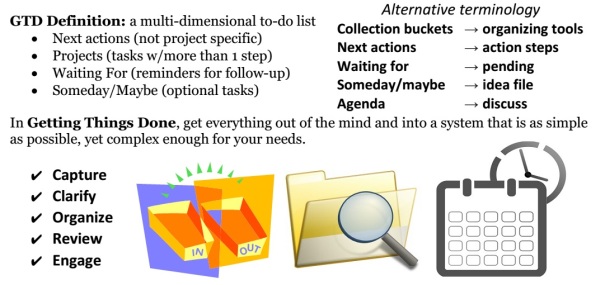
GTD Essentials

GTD

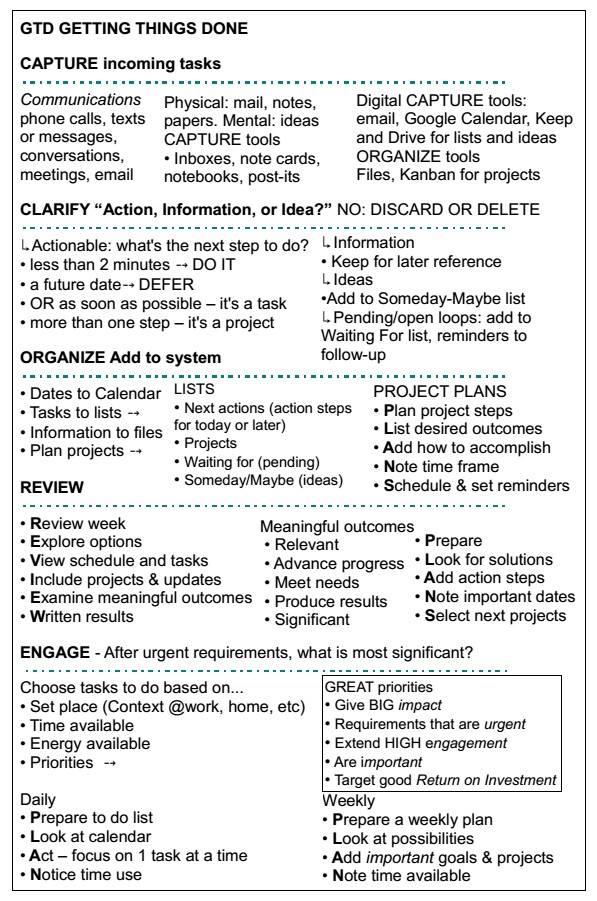
Getting Things Done: the art of stress-free producitivity” by David Allen, outlines a system for personal productivity. There are 5 steps: Infographic with the 5 stages of GTD

GTDbookmark

1. Capture
2. Clarify
3. Organize
4. Review
5. Engage

CAPTURE incoming tasks

Tasks often arrive through communication, in phone calls, texts or messages, conversations, meetings, email or mail. Analog capture tools: inbox, notebooks or cards, sticky notes. Digital capture tools: email, Google Calendar, Google Keep and Drive for lists and ideas. [incompletion trigger list pdf from gettingthingsdone.com]

CLARIFY – Process tasks: “Is it Actionable, Information, or an Idea?” No – DISCARD or DELETE

↳ Action is needed: what’s the next action step to do? [next action and project verbs]
• less than 2 minutes – DO IT
• a future date – DEFER
• OR as soon as possible – it’s a task
• more than one step – it’s a project
• pending/open loops – add to waiting for list
↳ Information – keep for later reference
↳ Ideas – add to Someday-Maybe list

ORGANIZE Put everything into the right place. Tools to organize: Files, Kanban for projects.

• Times and dates to calendar
• Action steps for tasks to lists ↴
• Information to files
• Plan projects ↴

↳ PROJECT PLANS
Plan project steps
List desired outcome
Add how to accomplish
Note time frame
Schedule and set reminders

REVIEW

Frequently look over and update your lists. Do a regular weekly review. [weekly review checklist]

Review week
Explore options
View schedule and tasks
Include projects and updates
Examine meaningful outcomes
Write down results

↳ Meaningful outcomes are…
• Relevant
• Advance progress
• Meet needs
• Produce results
• Significant

Prepare
Look for solutions
Add action steps
Note important dates
Select next projects

ENGAGE – After urgent requirements, what is most significant? [Priority Flowchart]

Choose next actions to do based on:
• Set place (Context @work, home, etc)
• Time available
• Energy available
• Priorities ↴

GREAT priorities
• Give BIG impact
• Requirements that are urgent
• Extend HIGH engagement
• Are important
• Target good Return on Investment

Daily
Prepare a to do list
Look at your calendar
Act – focus on one task at a time
Notice time use

Weekly
Prepare a weekly plan
Look at possibilities
Add steps for important goals and projects
Note time available

Lists in GTD: Getting Things Done (GTD) has been described as a “multi-dimensional todo list”.

  • Next actions
  • Projects
  • Waiting For
  • Someday/Maybe

I prefer different terminology for lists (next steps, pending, and ideas). Some of my lists are: To do today, To do next, Open Loops. The ideas of GTD are simple, but to follow the system is complex – see Me and GTD.

Learn about GTD: 

David Allen Videos:

Workflow Charts:

GTD workflow charts are helpful for understanding how the system works. Find links to many GTD workflow charts at GTD Made Visual and the GTD Pinterest board. Scott Moehring created an excellent GTD advanced workflow chart. The tips at the bottom are especially neat, don’t miss them. My attempts to visualize GTD are at What does GTD look like?

The Portable GTD mini system is designed for hands on use.

mini system

Learn more about productivity at Time Management 101.


Tagged with: , ,
Posted in productivity

Discovery of the Day

I added a link to Part Six of Discover U: an awesome post about personal mission statements by Craig Harper today. I love this quote: ” Being influenced by external forces is normal…being defined by them is tragic. ” If you want to become all you can be, go forth and read.

Posted in personal development

Discovery of the Day

Added this post about Behance’s Action Method Process from Productivity 501 to my articles about Action Steps, Projects and Time to Act.

Posted in productivity

Turn it on

A post at OrganizeIT about productivity got me thinking: What would a productivity attitude look like? I’m picturing a “can do” attitude. This attitude can be flipped on and off like a switch. I think of creativity this way too. It’s simply a matter of realizing we all have the ability and saying “yes” to it. And then the switch is turned on. Of course we can all be productive. Just say “yes.”

switch

Posted in productivity
eBooks

Enter your email address to follow this blog and receive notifications of new posts by email.

Archives
Blog Stats
  • 742,919 hits