Please Join!

Find tools and information for working smarter, developing skills, and living well.

Photo: Tools and information for working smarter, developing skills, and living well @ https://www.facebook.com/pages/Daily-Planit/131757233562316

Posted in work skills

Skills Employers Want #5 – Information Literacy

The ability to obtain and process information is fifth on the list of skills employers are looking for, according to the results of a survey from the National Association of Colleges and Employers.

Information is Power

In many stories, crucial bits of information uncovered by the characters make a huge difference in how things evolve. In stories like “The DaVinci Code,” or “The Girl With the Dragon Tattoo,” information is vital to unravel a mystery. Perhaps information about the law or shady business turns the tide, like in “The Firm,” “The Pelican Brief,” or “The Rainmaker.” Maybe it is critical medical research that is a matter of life or death like in “Extraordinary Measures,” which is based on a true story. There’s no doubt about it, information can be of great importance in real life. Good reliable information can make the difference in choosing the best option for health care coverage, housing, or investments. It’s no surprise that information is critical for business success, from data about sales to customer satisfaction.

brown wooden shelf with books

Photo by Olena Bohovyk on Pexels.com

Information Literacy includes these skills:

• Locate information
• Evaluate sources & validity
• Analyze: apply logic & statistics
• Data visualization

LOCATE: Sometimes information can be located on the computer, while other times the best sources are at a library. Knowing how and where to search for information is a skill that can be developed.

EVALUATE: Is the information from a trusted source? Is it accurate, current, objective and reliable?

ANALYZE: Is the information logical and statistically correct?

DATA VISUALIZATION: Can the information be communicated in an infographic or chart?

Learn how to locate and process information with these resources:

Tagged with:
Posted in work skills

Skills Employers Want #4 – Planning

The ability to plan, organize, and set priorities are the number four skills employers are looking for, according to the results of a survey from the National Association of Colleges and Employers. As you might imagine, there is lots of information on these skills right here on the Daily PlanIt!

At the Daily PlanIt:

READ

A book called “The Personal Efficiency Program” by Kerry Gleeson really gave me a better understanding of how planning works. (Affiliate link: I receive a small commission at no additional cost to you if you click through and make a purchase with an affiliate link. Thank you for your support!)

Articles:

WATCH

“How to Plan Your Week” from the Art of Manliness (applies to everyone!) (9:11)

Stephen R Covey on Weekly Planning (7:11)

Courses:

$

Tagged with: , ,
Posted in goals, productivity, work skills

Skills Employers Want #3- Decision Making & Problem Solving

Decision Making & Problem Solving are third on the list of skills employers are looking for, according to the results of a survey from the National Association of Colleges and Employers.Detour

Information:

Courses:

Another way to learn the skills: Choose the best company to use for purchasing office supplies.

Tagged with: ,
Posted in work skills

Ebooks vs Physical Books

Adventures with my Google Nexus Tablet, Part Deux
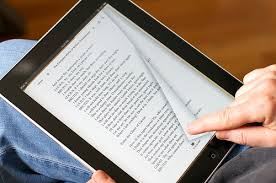
vs

I’ve resisted Ebooks for quite awhile. With my experience in libraries, I can’t help but feel that Ebooks are a bit of a threat to libraries. However, as I’ve explored the capababilities of my Google Nexus Tablet, I was curious to give them a try. I must admit I can see the appeal. Ebooks definitely have an edge when it comes to convenience and portability. The downside has been the difficulty of locating Ebooks that are free or inexpensive.

Physical books Ebooks
Pros Price (Free if available @library) Convenience-instant access
Location-where to read Can read in the bathtub Portability, Can read in bed w/o disturbing anyone
Bookmarks Can use cool bookmarks Automatically keeps place.
Search features Can be easier to flip pages to look for something Can use search feature to find text, can look up definitions of words
Cons Inconvenient to pick up/return to library Price* (newer titles usually must pay for)
Late fines possible No worries
Pro or Con? If not from library, can keep them, Take up physical space Probably won’t keep, Don’t take up physical space
Conversation starter People can see what you’re reading in public People can’t see what you’re reading in public

As I explore this new territory, I conclude that both formats have their place, and the best bet is to have one of each going at all times.

(Yes, trust me, I know it’s possible to drop a physical book while reading in the bathtub. However, it’s a risk I’m simply not willing to take with a $200 gadget.)

I discovered you can spend a lot of time looking for free Ebooks. You can go to this site and that site and browse for hours, leaving very little time for reading! Mostly what I found were classics I’ve already read or don’t have a burning desire to, and authors who are not well known. I want the best reading experience possible, with books that really interest me for the least price, without spending tons of time looking for what I want.

GOAL: Enhance the quality of my reading experience for the least amount of money. Or: read more good books for less.

Goodreads.com

Joining  Goodreads was a great first step to enhance the quality of my reading experience. After entering some books I have read and enjoyed, I explored similar ones (scroll to the bottom to see them) to add some to my “to read” list. When I hear about new books coming out that interest me, I check the reviews on Goodreads and if they are good, add the titles to my list. No more wasting time on books that may be free, but don’t match my interests.

For when I don’t have access to Goodreads via Wi-Fi, I have a “to read” list in Google Drive. I’ve learned on the tablet to press and hold on an unopened note title to make it available offline. With these lists, I’ll to keep on hand one physical book and one ebook at a time.

Where to begin to find the book you are looking for?

What format do I want?
Physical:
Am I willing to wait? Books at libraries may be checked out or have a waiting list, especially popular titles in high demand. If you aren’t willing to wait, you’ll likely have to pay for it.

  • Yes: check your local library to see if it is available free.

AddALL Book Search and Price Comparison

  • If you’re not willing to wait or it’s not available at the library, check addall.com to compare prices at different sources.

Ebook:

I use the Kindle app, so begin by checking the Kindle Store at Amazon.com, adding “free ebook” to the search. (If using a Nook, search for Nook Books at Barnes and Noble.)

If not available @Kindle (or the store for your device), check your local library. Is it available now? *

Sadly, the Inkmesh site no longer works. Might try Freebook Sifter.

Note: Amazon (daily and monthly) and Barnes and Nobles (on Friday) offer special deals on Ebooks.

Links to sites for free online books at Phonics Pow.

Are there better ways to search for Ebooks? I’d love to hear any advice on other quick and easy ways to find free or affordable Ebooks.

*Libraries do provide free access to some Ebooks, within limits. Publishers haven’t always been the most cooperative in working with libraries, so the book you want may not be offered, or immediately available. The interface to search your library for Ebooks also may not be the easiest to use. But for motivated users, it’s an option worth looking at.

Further Reading:

Posted in Books, productivity

Finding Great Affordable Online Video Content Faster

We interrupt the regularly scheduled programming for further adventures with my Google Nexus tablet.

My original intent in purchasing a tablet was to stream video via Chromecast to my television. I also have the option of plugging a long HDMI cord into our bigger television and streaming via my laptop.

GOAL: Enhance the quality of my viewing experience for the least amount of money. (Or: watch more good tv and movies for less!)

I began exploring the wealth of options for locating something I might actually want to watch, looking for the most efficient way to find great content that interests and inspires me, without spending a lot of money. I learned it’s easy to spend a lot of time looking for something good to watch, and then have no time left for actually watching something you want to see! I’ve discovered a great one-two punch with a combination of two websites: The Internet Movie Database and eTrizzle.

IMDB is the starting place for me, because I want to see reviews, trailers, and get ideas for more movies that are similar to ones I have really liked. No more wasting time on video that may be free, but doesn’t match my interests.

I add content I want to watch to my watchlist on IMDB, and when it’s time for a little tv viewing, I’ll check there. For when I don’t have access to IMDB via Wi-Fi, I have a “to watch” list in Google Drive. (To make a note available offline, press and hold on an unopened note title and choose that option.)

IMDB has links to watch instantly via Amazon Instant. But first, check the website etrizzle.com,, which compares the prices of various sources. Sometimes you can even find the movie you’re looking for free. It works for television content too. I checked for “Designed to Sell,” and there was a link to the official site, where there are some full episodes available to watch.

There is another option for access to free dvds: your local library. With a library card, you can access some movie and television series. This is an option if you are you willing to wait (many popular items have a waiting list) And go to the library to pick it up and return it.

An account with Youtube can be tailored to your interests by subscribing to channels, and rightthisminute.com can quickly connect you to some interesting videos. Most news channels offer a way to access content to stay informed.

This article from Marketingland.com compares Chromecast with other devices.

With that, I’ll sign off…I’d love to know if you have found other ways to access a quality viewing experience!

Posted in goals, productivity

Consume and Create in Balance

Adventures with my Google Nexus Tablet
When I got Chromecast, I learned that the operating system of my laptop wouldn’t work with it. Hmmm, I thought: Why not get a tablet, rather than change my operating system? It would have the added benefit of doing so much more! Thus began my adventures with my Google Nexus Tablet.

Discovery #1: Watch out, or you might be consuming much more than you’re creating.

Tablets are wonderful for consuming. They are so portable, and you can check facebook and your email, play games, watch video, research online, read ebooks, plan, or take a course. (Many activities, though not all, require a Wi-Fi connection.) They’re not so great for creating, though. My laptop is the better tool for writing, making an ebook, or designing an online course. Both consuming and creating have their place, but I can see if I’m not careful, the more passive consumption can easily take over a big portion of my day, crowding out the active creation. Consumption, especially of quality content (more about this later) can add enjoyment to my life. While taking a bit more effort, Creation (especially of quality content), can add value to life, and a degree of joy far beyond what can be achieved with consumption. Therefore, I am learning to be more aware of the amount of time I’m spending on each device, and in each activity.

Posted in productivity

Online Courses for Learning Skills

Online learning  (or elearning) is constantly growing, with courses on a wide variety of topics available at many websites. Some universities provide free courses on academic subjects. Check the list on the Smart Skills page and more at this Pinterest board.

Courses can vary widely in the content presented and the media they are presented in. So what defines a course?

Course:

  1. program of study: a program of study or training, especially one that leads to a degree or certificate from an educational institution
  2. class taught at educational institution: a session or series of sessions that students attend to learn a subject, often as part of a school curriculum that leads to a degree or certificate

steak

Whether you are consuming or creating online learning, consider the meat and the sizzle!

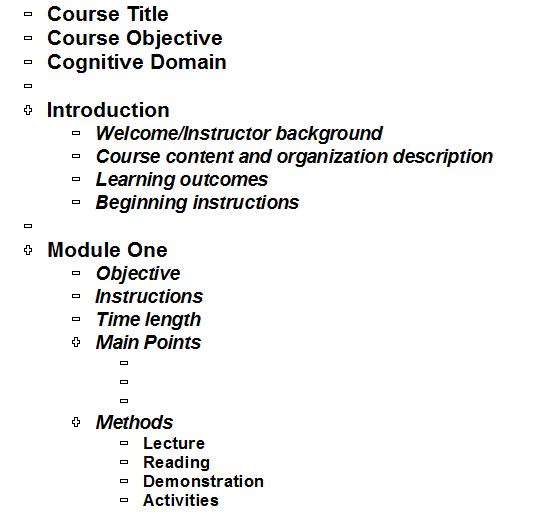
The meat…WHAT will be learned? What are the measurable learning objectives?  Course design choices for methods, media, and learner experience are based on the cognitive domain revealed by the measurable verbs in the objectives.

Content: what information is included? Is it logically organized with a beginning, middle & end and presented in small chunks? Does the Introduction explain the benefits of learning, and immediately grab attention? Does it appeal to different Learning Styles (Visual, Auditory, Tactile/kinesthetic)

The sizzle…HOW will it be learned?

In course design, the goal of all choices for methods, media, and engagement is to add clarity and interest:

  • Methods– Lecture, reading, demonstration, activities, exercises, projects, assignments
  • Media– Handouts, text, presentation, visuals, audio, video

Micro learning presents information in short, engaging, self-paced segments. Examples of micro learning:
Videos: James Wedmore, Big Think, TED talks
Explainer videos: like the ones from learnfree.org
Presentation style video: Khan Academy combines audio with blackboard drawings captured on video
Text + graphics: Infographics like the one at the simple way to create a compelling talk
Courses: BBC Learning English
Gamification: Duolingo (points/scores, leaderboards, badges, challenges/quests/missions, immediate feedback) Pinterest Board | Learn about Gamification with a course at Coursera.org
Games: Phonics Pow online games for reading

The best courses provide an engaging learner experience with relevant quotes, examples, stories, humor, discussion, questions, interaction, practice, feedback, role playing, case studies, scenarios, simulations…

Take a look at these highly interactive learning activities:

WHAT will be the outcomes? How will results be measured? How many learners actually complete the course, and did the course really teach what it set out to? Tests, surveys…

Resources

Courses on Course Design

Free Downloads:

Courseoutline

Course Outline Template (doc)

Methods, Media, Engagement and Tools Card (pdf)

Posted in work skills

Skills Employers Want – #2 Teamwork

Teamwork is second on the list of skills employers are looking for, according to the results of a survey from the National Association of Colleges and Employers.

Teamwork is like a symphony as the music from each instrument played by an individual combines into a beautiful outpouring. Another example of teamwork is the combined efforts of the ground team and astronauts for a common goal in the movie “Apollo 13.”

Five important elements to keep teams on TRACK are:

Target trust: communication is open and honest
Remember results: focus on outcomes
Accept accountability: roles and expectations are clear
Contain conflict: handle differences with respect
Keep commitment: clear goals drive action to succeed

Patrick Lencioni, author of “The Five Dysfunctions of a Team,” describes three important traits in his TED talk “Are you an ideal team player?” Be humble, hungry (hard working), and emotionally smart.

Learn The Characteristics of an Effective Team

Information:

Courses:

Free

$

Two practical ways to learn teamwork are to participate in a team sport or join a club. Learn more about how to Develop Work Skills and check out the Work Skills Toolkit.

Tagged with:
Posted in work skills

Skills Employers Want – #1 Communication

Communication is a critical skill in the workplace. It is not surprising that it is number one on the list of skills that employers want. It is a complex skill that is just as important in our personal relationships as it is at work. The best communicators are curious and courageous, authentic, respectful, and excellent listeners. They are present, observant, and provide feedback to verify understanding. They notice body language, emotional responses revealed by facial expressions, reflect feelings, and express empathy. They contribute interesting ideas and know how to ask good questions to connect with more meaningful conversations that lead to deeper relationships. They capture attention with appealing messages that are special, slightly surprising, helpful, amusing, rare or different, engage emotions, and are entertaining or exciting. It’s time to develop great communication skills!

Concentrate on being present
Listen actively
Observe responses
Connect with empathy
Know the communication process and methods

It can help communication when you know your own and others personality types. Improve communication with Myers-Briggs.

Concentrate on being present: Look at the other person, Eliminate distractions, Ask questions to clarify, Phones down! Choose to be clear, concise, complete, and considerate.

Listen actively: Focus your attention on what the other person is saying to you. Active listening is listening for understanding, and it is the power tool of communication.

Observe responses: Notice your own body language and that of those you are communicating with: hand gestures, head motions, expressions, looks, posture, and proximity. Pay attention to responses.

Connect with empathy: Employ emotional intelligence skills to express empathy.

Know the Communication Process and Methods

While communication is simply an exchange of information, there are many things that can interfere with the sending and reception of a message.  A message includes the content, the voice, and non-verbal or body language.

TRANSMISSION (verbal & nonverbal)
↳ VERBAL: content (spoken words) plus voice (paralanguage)
↳ NONVERBAL (kinesics)
A large part of communication comes from tone of voice and nonverbal components.
MESSAGE [encoding (to transmit) and decoding (to receive) meaning]
⤍ RECEPTION (listen & observe)
⤍ RESPONSE (verbal & nonverbal plus feedback)

VERBAL

The CONTENT of the message is the words that are chosen

VOICE (paralanguage)

Clarity: speech and meaning
Rate: fast – slow
Intonation: emphasis and pitch
Soft – loud volume
Pitch: high – low

Watch Julian Treasure TED talk “How To Speak So People Will Want to Listen”

NON VERBAL (Sometimes called kinesics or body language)

• Hand gestures
• Head motions
• Expressions
• Looks – eye contact
• Posture and proximity

TED talks “Your Body Language Shapes Who You Are” by Amy Cuddy and “The Power of Non Verbal Communication” by Joe Navarro.

CONTEXT

• Cultural
• Relational
• Individual
• Social
• Physical environment

RECEPTION relies on clear channels and good listening skills.

Concentrate attention
• Look to notice body language
• Evaluate emphasis in voice
Ask questions to clarify
Reflect and respond

RESPONSE

VERBAL FEEDBACK + VOICE and BODY LANGUAGE

Reflect, “how do you feel about that?”
Ask questions, “can you tell me more about that?”
Paraphrase, summarize in your own words, “is that right?”

When is it best to communicate in person, or by text or telephone, by email or mail? Choose a method of communication based on the content and who you need to communicate with. Consider:
Formality and feedback needed
Response required
Audience number and preferences
Message length and urgency
Emotional or confidential content, documentation

The how to choose Communication Methods Mind Map created with Mindmup:

CommunicationMethods

Daily PlanIt posts about communication:

Meaningful conversationsInfographic The Art of Conversation
Listening SkillsInfographic Listening Skills
Understanding Body Language – Infographic Understanding Body Language
Simple Way to Create a Compelling TalkInfographic How to Engage Interest
12 Communication Skills

Additional Communication Skills:

Learn the #1 Skill that Employers want

CommunicationProcessLarge

More from the Daily Planit:

Books and videos: [Amazon affiliate links provide a small commission that helps support the Daily PlanIt]

Articles:

Courses:

Free

$

TED Talks to sharpen communication skills, This is your brain on communication

This is one of a series of posts based on the results of a survey from the National Association of Colleges and Employers on the top ten skills employers want. Each post provides links to websites for learning the skills.

Tagged with:
Posted in work skills
eBooks

Enter your email address to follow this blog and receive notifications of new posts by email.

Archives
Blog Stats
  • 742,834 hits