
Terrific post by Lisa Peake on the dreaded inbox via LifeDev.
What’s working for me
System review
see A Look at My System and Workspace for an update
How I handle:
- Calendar & Email: Yahoo. maybe someday gmail.
- Ideas: At home-clipboard. At night-bedside notebook + pen that lights up. At work-project folders.
- Master List: index cards in a holder.
- Projects: a version of Tammy Cravits Post-It Portable Workspace plus a project list on an index card to carry with me.
- Repeating Tasks: lists and email reminders. I still long for a better way to integrate these automatically into my system.
These are things that need to be brought together to do the weekly review.
Things I’m beginning to see about Getting Things Done
The Next Action list is really a version of master list, that pulls together the next actions needed for all projects. If you like to see the actions listed with the projects, some kind of method is needed that automatically combines all the next actions into the master list and still enables you to view them in the context of the project. I read a post about this somewhere that I can’t find now, however it used tools I don’t have. 😦
Michael’s thoughts on this are quite interesting.
Contexts are not very important to me. Whether at work or at home, I virtually always have access to a computer and a phone. Although I do have one page of home projects and another of work projects.
Mindsweep is a word that actually makes my brain freeze up. Of 4 ways to trigger ideas at GTD Portal, walking around appeals to me most.
Posted in productivity
Repeating Tasks
 When you put repeating or recurring tasks on autopilot, you free your mind for more important matters.
We all face routine tasks to maintain our home, and most jobs involve regular duties that must be completed. It’s important to have a method for them to pop up on your radar to deal with them, without cluttering up your to do list.
What are the tasks that you must accomplish on a regular basis at work and at home? Identify the repeating tasks that must be done on a daily, weekly, monthly, and yearly basis at home and work. You may want to include an estimate of the time it takes to complete the task, and note if the task is best performed at a certain time or place, if peak time or a tool is needed, etc.
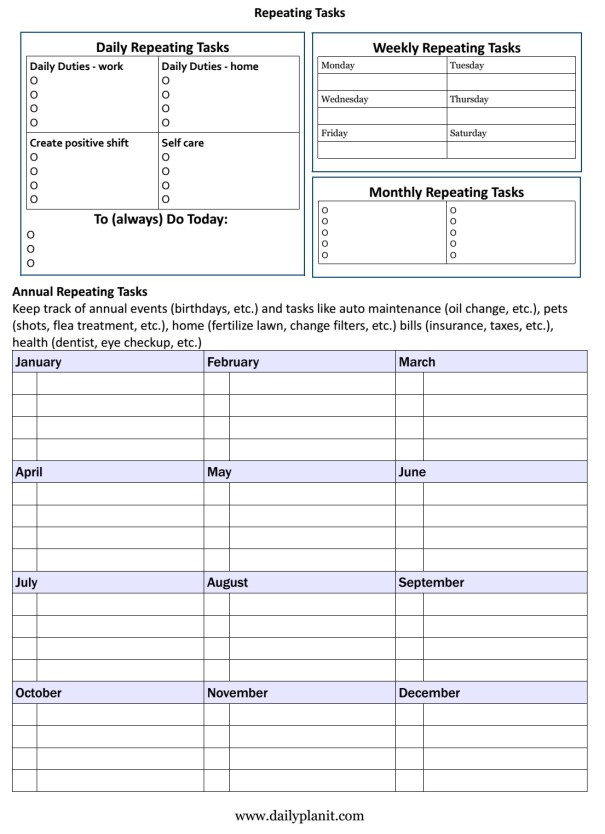
Use a repeating task checklist: download a free one page form with daily, weekly, monthly and annual Repeating Tasks, or a Repeating Tasks Worksheet is available at the Daily PlanIt Shop. Another alternative is to use separate lists according to frequency:
DAILY
There are some things you may want to remember to always do today. Daily duties for home often include cleaning and cooking. Daily themes can help with these tasks. Job duties vary depending on the work you do. Include important stuff, like activities to create positive shift and self-care activities that have been shown to increase well-being. Sketch out daily repeating tasks for a daily routine with a Daily Plan Form or a Time Log.
WEEKLY
For home, weekly tasks may include menu planning, a weekly review, or focused cleaning on a different room each day of the week. You might have a goal of getting together with a friend once a week, or to save a certain amount of money each week. Examples of different goal frequencies are at Goal Master List. List weekly repeating tasks on a Weekly Repeating Tasks (pdf) form at or a Weekly Planner from Vertex42.com.
MONTHLY
Monthly repeating tasks may be financial, goals, or for work or home. This may include things like paying bills, filing papers, and backing up your computer. In Before you create a To-Do List, Michael Hyatt talks about making a Master Task List, which are the most important tasks that add value if you do them. These are often important, but not urgent, what I call VIP AIMS. Download a Monthly Repeating Tasks pdf to list monthly repeating tasks.

YEARLY
Keep track of annual events and tasks like birthdays, auto maintenance (change oil), pets (shots, flea treatment, etc.), home (fertilize lawn, change filters, etc.) financial (bills, insurance, taxes, etc.), health (dentist, eye checkup, etc.) Download the Annual Repeating Tasks pdf to list yearly repeating tasks, and check out the Annual Review Metrics form at An Annual Review.
Tips for dealing with repeating tasks: Use checklists, have a system for handling them, include them in your daily routine. You can also use time blocking and focus themes.
Automate:
High-Tech
- Schedule repeating tasks in Google Calendar, for automatic reminders on your computer and/or smart phone.
- Set recurring tasks in your To-do app, or keep a separate to-do list of repeating tasks. Learn more about how I manage tasks with the Daily PlanIt Keep It Super Simple (K.I.S.S) System and an inside look at my system and workspace.
Low-Tech
- A Calendar, Tickler File, The Portable GTD mini system
- GTD analog tools listed at Zen Habits Massive GTD Resource List
- Besides the cleaning checklist above, see more cleaning checklists at Household Notebook (More Cleaning Checklists)
- free printable planner inserts at Free Tools.
More Reading:
Routines at Zen Habits, How to Use Your Calendar and 5 ways you can automate your life and save time at Asian Efficiency, repeating tasks at the Daily PlanIt Wiki.
This is one of the weekly activities for a Year of Personal Development.
What We Control
Many problems result when we attempt to control that which is outside of our control.

- Stephen R Covey’s Circles of Influence help to recognize areas that you can control or influence, and things that you cannot.
- Emotional Competency-What You Can Change and What You Cannot
- Part of the Serenity Prayer is about recognizing the difference. Printable version.
Which of these things do you think is within your control?
- Thoughts
- Where we were born
- Actions
- Race
- Values
- Age
- Education
- Intelligence
- Feelings
- Birth family
- Wellness
- Health
- Ourselves
- Physical attributes
- Others
- Weather
- Traffic
Things within our control include our own words, actions and thoughts.
- Speech: how we communicate, what we say
- Actions: what we do
- Thoughts: what we think
Although there are many things outside of our control, that does not mean we are powerless. We may be able to influence some things like:
- Wellness: health may be influenced by choices for diet and exercise
- Emotions: feelings are influenced by thoughts and actions
- Beliefs: beliefs can be influenced by our perceptions
- Skills: we can learn to use and develop strengths
In Rational Emotive Behavior Therapy, Albert Ellis shows how our feelings come from the thoughts we think. Learn how to understand emotions with REBT.
We can grow with personal development to:
- Be courageous
- Rally strengths and develop self-esteem
- Add agency
- Value a growth mindset
- Expect and overcome obstacles
- Rely on resilience
With awareness, we can choose to be CHAMPS at influence with:
- Communication
- Habits
- Actions
- Mindset
- Perceptions
- Self-talk
We do not control others, but communication skills let us SHAPE situations by:
• Setting limits
• Helping others and sharing information
• Asking for what we want
• Persuading and influencing with appeal
• Expressing opinions
Although we don’t control everything, this doesn’t mean we can’t set goals and work towards them. It does mean learning to accept that there will be obstacles and problems in life that can affect outcomes. The alternative is to drift aimlessly without attempting to shape life.
Josh Hall’s TED talk on the Illusion of control. This is one of the weekly activities for a Year of Personal Development.
Posted in personal development
Survival Needs
As I think about what I’ve been spending my time on lately, I’m reminded of Maslow’s hierarchy of needs. We must take care of those important survival needs before moving on up to higher things. Do you think I’ve been:
a. surviving winter
b. preparing for the upcoming holidays
c. improving training designs at work
d. all of the above
The answer is: d!
For one who is supposedly into planning, I wasn’t all that well prepared when a snowstorm hit. I think exposure to the Just in Time theory is partially to blame. Also the small size of my home which simply does not allow for huge stockpiles of supplies. However, there are certain things it’s good to have plenty of when you’re snowed in: coffee, milk, pet food, and so forth. The snow is melting now and it would be a good idea to give some more thought to this.
I try to keep things fairly simple for the holidays. Still, there are extra things that must be done, and these extra things just take some time. Thankfully, packages have been sent and cards (mostly) mailed now. I can almost relax and enjoy it now.
I’ve been developing a staff blog to communicate information to assist in training new employees and to share opportunities for learning. I think it’s got the potential to be helpful.
Posted in personal development
Email Management
Managing email is a major task. Knowledge workers spend 28% of their time on email.-bakadesuyo.com. Luckily, there is lots of information available on how to handle it. Listed below are a few links to articles I have found helpful.

The four D’s for decision making are similar to the ones for paper management.
Getting To Done: email triage at Lifehacker describes a folder system.
Tips for Mastering E-mail Overload by Stever Robbins.
Melin Mann at 43 Folders has an “Inbox Zero” series. Here is a slideshare.
8 Things Email is Good For and How To Keep Your Inbox Empty: 7 Simple Email Tactics from timemanagementninja.com
Posted in information management
Am I making this too difficult?
I was a bit surprised when I read Merlin Mann’s post at 43folders about his very simple folder system for email. I have ten folders and it still doesn’t seem like enough. Then I read his notes about the latest podcast with David Allen. And I must agree that the more I struggle with this time management stuff, the more I find out that it is indeed, after all is said and done, in his book. For some reason, it’s just not easy to see that on the first reading.
I’m reminded of making a “work” of art, and being told: “You’re trying too hard!” The simplest system possible that is still enough of a system to work well is what we are aiming for. I plan to review the folders I use for email, computer files, and physical file system to see how close the set-up is. I have a feeling they are not very similar and that this will take awhile!
LifeDev made the point that “80% of projects you define with more than one action need only a listing of the outcome and a next action.” Only the other 20% require more thought and planning. That was something from the book “Getting Things Done” that I hadn’t “gotten” previously. Why make it more complicated than necessary?
Posted in productivity
Paper Management
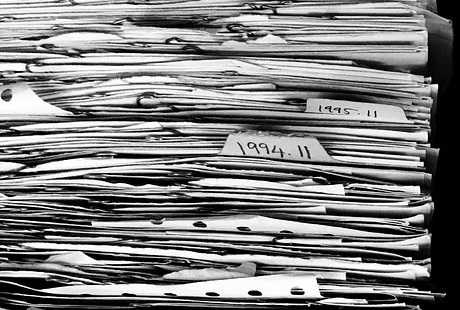 Oh, the paper possibilities! You can pile, you can procrastinate, you can create problems for yourself, or you can prepare a system.
The 4 D’s of Productivity apply to paper management. They are:
- Do It
- Delegate It
- Delete It
- Delay It
Stephanie Winston is known for her TRAF system of dealing with paperwork, with four things you can do with paper:
- Toss it
- Refer it
- Act on it
- File it (I prefer to consider filing under the Action heading, leaving F to stand for Follow-up.)
I don’t do much delegating or referring, so the R can be for Reading.
Toss: Questions to ask when deciding whether to retain or toss a piece of paper: 1. Is this only for my own information, and now I know it? 2. Is this quality information? Objective? Reliable? Timely? Useful? Clear? (Keep the best, and forget the rest) 3. Does this information exist elsewhere? If needed in the future, could it be replaced?
Reading: Clip articles that look interesting. After reading, use criteria above to evaluate the information and make a decision whether to toss or file.
Action: Files could include a red file for priority items, to read, to file, ideas and projects, etc.
Filing: Set up a file system that works for you.
Resources:
File It, Find It Home Filing System (pdf)
How long to keep files? See the record retention guidelines at Organize Your Financial Paperwork from Forbes. NOTE: There are different record retention guidelines online that can vary on what they recommend. I am not an expert in this field! This one is nice because it’s easily printable, thereby adding to your paperwork!
Books:
- “Taming the Paper Tiger at Home” and/or “Taming the Paper Tiger at Work” by Barbara Hemphill
- “Organizing Your Home Business” by Lisa Kranarek
Posted in information management, productivity
Discoveries of the Day
Reading chris brogan led me to InstigatorBlog which led me to…
Goal setting at emomsathome…no more negative goals, which led me to…
motivation at Tales of a Corporate Hypnotist, which led me to…
toach.net…how to increase proactivity.
Posted in personal development


 Daily PlanIt