Time management 101

Time-Management-101

A Tutorial for Increasing Productivity

calendar flip

The System

  • Select a calendar to manage your time, tasks, and lists.
  • Your choice – choose what works best for you.
  • Start with a To Do list and set priorities to complete the most important tasks. ↴
  • Then add other lists that you need, and decide where you will keep them.
  • Essential goals and projects to keep track of.
  • Make lists of repeating tasks.

Possibilities:

compass

The Focus

Adjust direction by embracing values
Clarify what is important – gain direction with a value statement that pinpoints what you do and why (the power tool for purpose). It includes how you add value based on what your values are.
Target GREAT priority tasks to say YES to:

  • Give big impact
  • Requirements that are urgent
  • Extend high engagement
  • Are important
  • Target good return on investment

Four Fantastic Tools for Focus

planner

The Plan

Use your system to:

ClockLarge

The Routine

Get Organized

timetarget

Goals and Productivity are like peanut butter and jelly. To spend your time where it most matters to you, begin by setting goals that align with your value statement or Unique Selling Proposition. Learn how to set goals and achieve them with this free tutorial. Learn more with the Daily PlanIt eBook “Get Goaling”

“Efficiency is doing the job right. Effectiveness is doing the right job.”-Peter Drucker

Toolbox

Tools for Productivity (hint: see Free Tools)

Daily

Weekly

Learn about the study of productivity, with videos and courses

Master Productivity: Productivity Levels (pdf based on posts at The 2Time Mgt Blog)

MORE RESOURCES

Posted in productivity

To Do List

A To Do list is a basic tool to be more productive and an important part of any system for task management. Some people like to keep an electonic list or use a to-do app, while others prefer a written list. Whatever you choose, creating an effective To Do list is a part of daily planning that will help you combat procrastination and get motivated to get the important stuff done.

Has your To Do list gotten out of control? When you list everything you need to remember and get done, the result can be overwhelmingly long.

The To-do Today list is best kept simple.

Superman

Super Simple ways to pick priorities:

  • Oliver Burkeman advocates planning each workday around a 3-3-3 model, with three hours for deep work, three urgent tasks, and three maintenance tasks.
  • The 1 – 3 – 5 Rule suggests choosing one large task, three medium tasks, and five small tasks.
  • The Most Important Tasks (MITs) method from Leo Babuata of Zen Habits. After reviewing your calendar, choose only a few MITs, three things that MUST be done today.

Important tasks can be routine things, like a report that is due today. Sometimes there are unpleasant frogs or DAM CRAP that must be dealt with. But don’t let the less urgent Very Important Pursuits that are Active, Inspiring, and Meaningful Solutions get lost in all the distractions that compete for attention.

With your to do list at hand, begin the day by focusing first on the top priority task. Once that is completed, move on to the next. If time is available, add more tasks from your weekly plan, repeating tasks, work goals, and action steps for goals and projects.

When you keep your To-do Today list simple, you need somewhere else to keep all the OTHER stuff you need to do. That’s why we need more than one to-do list for The Daily PlanIt Keep It Super Simple (K.I.S.S.) System. Decide how you will capture these items in other lists. These may be kept in a To-do app, or a list in Google Drive or Evernote. I have come to really appreciate the abilities of Google Keep for lists and reminders. Or if you prefer paper, you may want to keep them in a planner or notebook.

Beyond the To-Do Today List Options:

  • You can set up a To-do Next list, or lists for To-Do Later, To-do This Week, etc.
  • You can use a master list.
  • You can use lists from Getting Things Done  (GTD):  next actions, projects, waiting for, and someday/maybe. (I prefer different terminology)

Incoming Tasks

During the day, be prepared to capture tasks that arrive in various ways: via email, meetings, conversation, phone messages, etc. Recognize and add incoming tasks into your system, and delete the ones you accomplish.

De-clutter your To-do lists

Are your To-do lists cluttered with repeating tasks and daily routine activities? Few time management systems have a good way to deal with these. Here’s how to de-clutter your To-do lists.

Repeating (or recurring) tasks

We all have repeating tasks for home and work. For home, there are maintenance tasks that are necessary to keep life running smoothly and errands like getting gas or going to the bank. For work, there are often job duties that are done on a regular basis. You can keep a separate list of repeating tasks in a To-do app so they don’t have to be re-entered each time they need to be done. Just assign it to a date within your To Do list and it’s there. Once completed, simply send it back to the repeating task list. Even though I like having a list of repeating tasks, I don’t use the recurring feature in to-do apps, because some of these tasks are needed on an irregular basis. If it’s something I will likely forget without a reminder like changing the oil in the car that I want to remember in a few months, I schedule it in my calendar.

Daily routine activities

I don’t like the things I do as part of my regular daily routine to constantly show up in my tasks or calendar. I prefer to keep them as a separate list in Google Drive.

To-Do Apps: There are many options available for to-do apps. See Apps for Productivity and learn about the Daily PlanIt K.I.S.S. System. Google Tasks is a part of Google Calendar that has become a very useful tool.

For People Who Prefer Paper

Daily PlanIt free printable forms

From Others: The To-do List from Samplewords is a neat pdf you can type your own information in. Find more at the Free Tools page and at the Productivity Tools Pinterest board.

You can manage your tasks with a To-Do Today List and other to-do lists you like. To-do lists are a big part of daily planning. The next step is to actually get them done! Learn more at the Daily PlanIt Time Management 101 Tutorial. You might also like Planning is Thinking, a Planner Checklist, a weekly review and a Weekly Plan.

Further Reading: Craig Jarrow, the timemanagementninja, calls it a TODAY list and shows 10 Things Wrong With Your To-Do List, Back to Basics: How to Simplify Your To-Do List and Make it Useful Again from Lifehacker,  No More Bloated To-Do Lists! at Instigator Blog, Inc Article The Surprising Secret to Time Management,  Do Your Most Important Task First? at 99u & List of Ways to Ruin a List at Brazen Careerist. Watch Creating a To-Do List that Really Works video from Michael Linenberger. See also Time Management at Wikipedia

Posted in productivity

Discovery of the Day

What kind of world do you want? The song “World” by “Five for Fighting” has motivational lyrics and a beautiful melody -on the Two Lights album. Think Anything. Start Now.

Posted in personal development

What’s the Motivation?

Motivation is important to accomplish goals, establish habits, combat procrastination, and get the Important Stuff Done. Motivation drives the desire to act or initiate change, and finding the motivation to take action can be challenging! Motivation is the result of movement, not the other way around. Read more about “The Motivation Myth” by Jeff Haden, Ted talk The most successful person in the world. (Amazon affiliate links to books provide a small commission to support the Daily PlanIt.)

Motivation can come from within (intrinsic) or from outside yourself (extrinsic). It can be intangible, like feedback, or tangible, like grades or money. It may be positive like praise, or negative like losing a privilege.

MotivationMatrix

Some examples of extrinsic motivators that are positive are being paid a bonus for a good job (tangible), and receiving recognition, (intangible). Negative extrinsic consequences may be paying a penalty (tangible) or receiving negative feedback (intangible). Positive intrinsic motivation like affirmations can be powerful, but the opposite of this is negative thoughts like self-criticism, which are demotivating and limit progress.

What motivates each individual varies as we are different in our personalities and what we find rewarding. Explore ways to MOTIVATE!

  • Match Personality
  • Outcomes
  • Timing
  • Intrinsic or Extrinsic
  • Values
  • Add rewards and consequences
  • Tangible or Intangible
  • Energy

Match Personality

Myers-Briggs is a popular method for determining personality types with eight categories in four dichotomies that can combine in sixteen types. Extroverts who organize with order (Judging) are likely to be motivated by external factors such as power and prestige and tangible rewards like money and awards. Extroverts who organize with flexibility (Perceiving) are likely to seek public recognition, novelty, and chances to collaborate with others and express creativity. Introverts who organize with order (J) are likely to be motivated by internal factors and intangible rewards like opportunities to learn, use skills, and generate ideas. Introverts who organize with flexibility (P) are likely to seek creative exploration and want to improve the world and help people. Mastery likely appeals to all types with high Judging, and all types with high Perceiving may seek autonomy.

Outcomes – gain motivation by observing progress on measures.

Timing – consider how often and how soon rewards are received after behaviors. Self-motivation is easier during our peak time. The science shows that prime time for most of us is for two hours about an hour after waking.

Intrinsic or Extrinsic – Intrinsic (internal) motivators are often intangible. Positive intrinsic motivation is powerful, but can be affected by moods, so extrinsic (external) motivators that come from outside of ourselves can have a place. However, be aware that external incentives can decrease intrinsic motivation. Also beware of negative internal thoughts and beliefs that are demotivating and limit progress.

Dan Pink, author of “Drive: the surprising truth about what motivates us,” talks about Mastery, Autonomy, and Purpose. Mastery is the urge to get better at stuff, to learn and create. Autonomy is the desire to act with self-direction. Purpose is the desire to make an impact and add value to life with our strengths and talents. The desire to connect with others is also a powerful motivator. These all related to needs, and are all positive intrinsic motivators. A value statement that clarifies what we do and why is the power tool for purpose.

NeedsMotivation

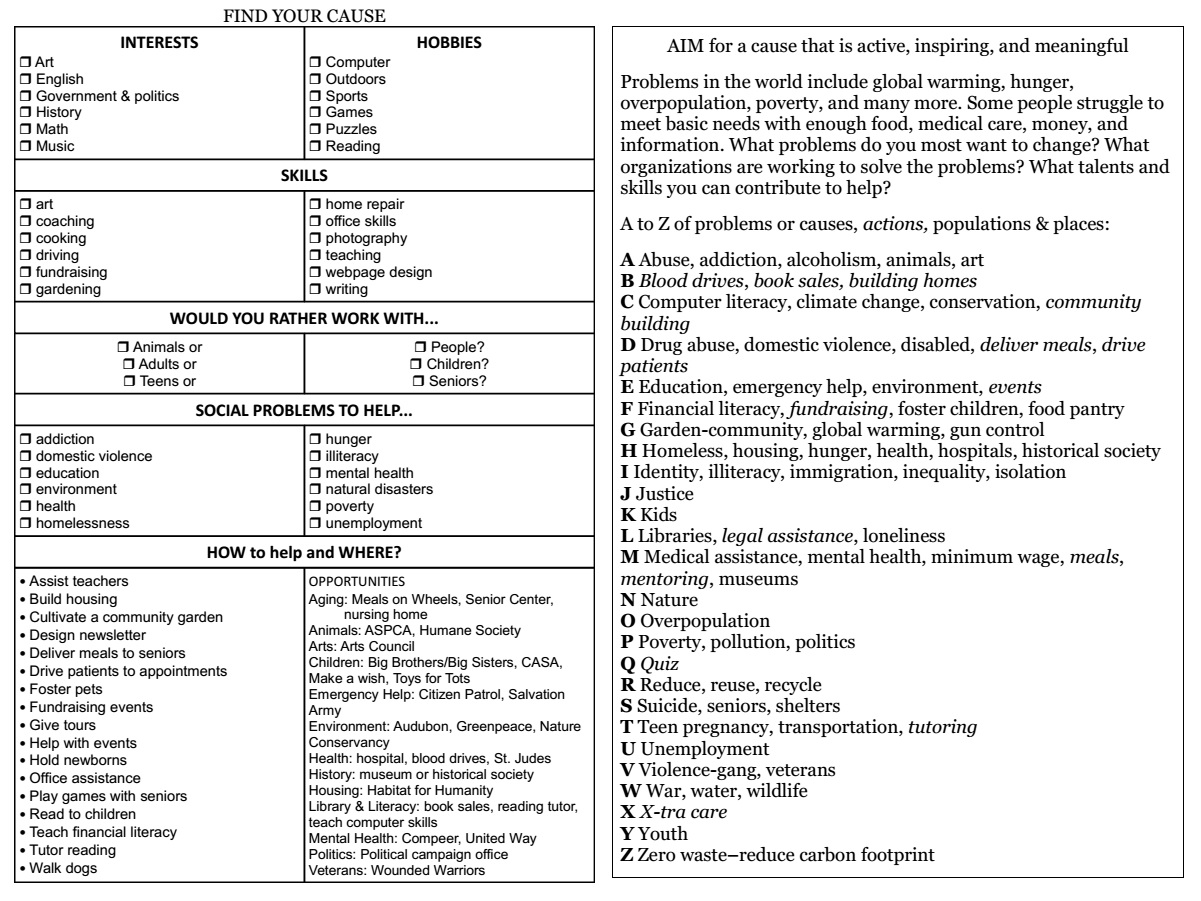
• Contribution (Purpose) – AIM for a vision that is active, inspiring, and meaningful
• Connection (People) – relate with others
• Competence (Mastery) – correct level of challenge to find flow
• Control (Autonomy) – take action with self directed choices

Valuesmeaningful goals have built-in motivation, so follow your values. AIM for a vision that is Active, Inspiring, and Meaningful.

Add rewards and consequences – a “carrot” is a reward for good behavior. Everyone has their own ideas about what they find most rewarding, so rate the importance level of various rewards for you. Some rewards are bigger than others, so choose a small reward as incentive to accomplishing small steps toward goals, and a larger one for completion. A “stick” is a negative consequence for poor behavior, and they can influence behavior too. For example, putting a dollar in a swear jar each time you slip up can be an effective way to break a bad habit.

Tangible or intangible – rewards can be tangible like grades or money, or intangible like recognition or positive feedback.

Energy – energy is a limited resource. Tasks and projects that require high motivation are best tackled when energy levels are high. Increase energy with self-care activities like getting enough exercise and rest, drinking lots of water, and eating healthy foods.

All of these factors are important for both self-motivation and at work. There are additional things to consider for work motivation.

Motivation at Work

Identifying your work values can help in finding a compatible career and clarifying motivation. Learn more about your work values at careeronestop.org.

Work Values

  • power
  • money
  • prestige
  • independence
  • challenge
  • mastery
  • achievement
  • recognition
  • security
  • self expression
  • collaboration
  • service to others
  • relationships
  • creativity
  • variety

To STREAM motivation in the workplace:

  • Set work goals that are relevant to the mission and goals of the organization. Optimal organizations are clear about them.
  • Train with learning activities to develop skills. Optimal organizations provide opportunities for learning and encourage and support growth.
  • Recognize and reward progress. Optimal organizations provide incentives that employees want. A word of praise for a job well done can go a long way.
  • Expect the best. Optimal organizations communicate their expectations. Employees also have expectations of an employer.
  • Always be aware of the value that your job provides. Optimal organizations provide feedback to employees.
  • Measure outcomes and notice results. Optimal organizations provide information about progress. A simple scorecard makes outcomes like a game providing motivation to improve the score.

Self motivation is one of the skills of emotional intelligence. It can help to mind the GAPPS:

Growth Mindset
• Add habits
• Plan goals
• Pursue purpose
• Set priorities
• Select strategies to overcome procrastination

Books and TED talks

Additional Reading

More on Motivation from the Daily PlanIt:

Posted in personal development, work skills

Happiness is a good book…

…or is it? “Stumbling on Happiness” by Daniel Gilbert is a book about a long pondered puzzle-what happiness is, and how best to pursue it. Humans have many illusions about happiness, and the author sets out to explain the reasons for the regular mistakes we make in the pursuit of it. In the forward, he says: “No one can say how you will feel when you get to the end of this book, and that includes the you who is about to start it. But if your future self is not satisfied when it arrives at the last page it will at least understand why you mistakenly thought it would be.”

The author is a professor of psychology at Harvard, and in the first chapter, proposes that the human being is the only animal that thinks about the future. Imagination is the most important achievement of the human brain. While living completely for the future might not be best, neither is living completely in the present, as anyone with damage to the frontal lobe could tell you. Imagining pleasant future events is pleasurable, and imagining unpleasant future events can minimize their impact.

We want to know what is likely to happen so that we can do something about it. Making things happen is a source of joy and a fundamental need. We want to steer the direction of our boat toward the future that looks better. The truth is that when we arrive at the future it will look different than the future we think we see now. There are illusions of eyesight, of hindsight, and also foresight-and all are explained by the same basic principles of human psychology. Just as memory fills in details that didn’t happen and leaves out details that did, imagination fills in details that won’t happen, and leaves out details that will. Finally, he offers a remedy that is not acceptable for most of us.

Happiness is not easy to define, as different people have different reactions to events. However, by the conclusion of the book, the author proposes that we are not as unique after all as we think we are. The best way to predict our own happiness is to get information from someone who has had the experience we are contemplating. But we almost never choose to rely on this method.

We are always busily predicting the future at least a little bit. It’s a pity we aren’t better at it. We generally have the welfare of our future selves in mind when we make choices in the present. If we deny ourselves a donut now, it is with the belief that we will appreciate being in better shape tomorrow. However, our future selves are quite likely to be critical of our present choices.

Our brains make errors in logic that lead us to continually predict incorrectly what will make us happy. While we are stuffed with mashed potatoes and turkey it is impossible to imagine ever being hungry again, even though we know it will surely happen. After childbirth, the memory of pain is quickly forgotten, misplaced by the joy of parenthood. When events do not go the way we had hoped, we are adept at rationalizing our view to make it less painful. On the other hand, the things we think will make us happy, often fail to meet expectations. Adversity often comes complete with positive as well as negative outcomes.

Does awareness of the faulty logic we employ make us any happier? Unfortunately, no. It seems we are incapable of imagining accurately, and unwilling to be guided by the opinions of others.

Posted in Books, personal development

tv or not tv

I’ve been quiet for awhile as I’ve been dealing with television issues in one form or another. It all began when I finally decided to add local television stations to my satellite. I had postponed this for quite awhile, saving that extra 5 bucks a month. Well Hmmm. The only problem was it didn’t work. When I called DISH Network, a nice lady explained my satellite probably needed a free upgrade to receive them. (While on the phone with the nice lady I requested a new remote-more to follow as the saga continues.) Well, that sounded okay, so the guy came on Wednesday to switch it out. Said he hadn’t seen a satellite dish that old for awhile. Then he came inside to hook it up to the tv. Hmmm, that’s odd. No picture. I was puzzled as the tv had worked fine earlier. So I hauled down a small tv, and whadaya know it worked. Sadly, this meant my larger tv had coincidentally bit the dust. Dust, static electricity or just plain old age had brought to an end it’s years of faithful service. Meanwhile I was reduced to a small tv on the floor until I could go tv shopping.

That same day my new remote arrived. My old one had issues, you might say. The buttons were very difficult to push even with maximum effort, and the up arrow just flat-out quit a few years ago. That was the best 20 bucks I ever spent. Now I’m wondering what on earth took me so long to make the call.

So anyway, yesterday I enlisted the services of my son to go on a quest for a new tv. I needed his brawn to haul it and his brains to hook everything up. I found myself entranced by the elegance of the LCD tvs-so thin, so light-weight, so beautiful. I was smitten. We noticed a display model they were selling for 70 bucks less, so we took it home and spent a bit of time attempting to hook it up before conceding defeat and taking it back to the store and a huge line at the customer service desk. My poor son. Luckily the new one in the box we (meaning he) quickly ascertained had no problems and everything was clear skies and smooth sailing thereafter. I’ve spent most of today just admiring it.

The whole process did take some time. Lessons learned: a bargain isn’t a bargain if it doesn’t work. When things aren’t working well and don’t cost much to fix, for goodness sakes just do it! Making lasagna is a great way to thank son for hard work.

Posted in personal development

Learning Activities for Work Engagement

Work that engages us meets our needs for meaning, making a contribution with our strengths, and connection with others, according to the Gallup organization. Gallup surveys frequently show low levels of engagement at work. Since a large part of our time is devoted to work, finding a job that meets these needs contributes greatly to our happiness. The cost of low work engagement is high, but there are ways to increase work engagement.

silhouette photo of person holding door knob

Photo by George Becker on Pexels.com

STARTING toward work engagement:

Self mastery with autonomy
Take on important work
Add meaning with impact
Recognition of good work
Target skills to develop
Invite participation in growth opportunities
Nurture interest and involvement
Gain results with relevant work goals

Self mastery with autonomy. Determine your own DIRECTion.

• Decide – make a choice and plan a path
• Invest in independence
• Resolve to persevere
• Execute with agency
• Confront fear with courage
• Take action

Take on important work. To find work that really matters, look for your VIP AIMS: Very Important Pursuits that are active, inspiring, and meaningful solutions. Focus on these even if it may be difficult.

Add meaning with BIG impact. BIG = Bold change, Impressive influence, and Great movement. Learn more at the Priority Flowchart. See the impact of your work by choosing measures for goals and reviewing results regularly. This provides feedback which is important for flow.

Recognition of good work. Recognition and appreciation is the number one thing employees want. Celebrate accomplishments with Rewards.

Target skills to develop. Meaningful work often uses your strengths. When you develop skills, there are even more opportunities for engagement.

Invite participation. Include opportunities for growth with learning activities. A learning organization encourages learning with a system that allows advancement with approved learning activities. Individuals are responsible for their own development, and document progress with a plan for learning.

Grow professionally with an Individual Development Plan.To create one, first identify needed skills, then choose learning activities that will increase them. Read more about Individual Development Plans at Indeed, and find a form at Individual Development Planning from Yale.

  1. Review job description (or an O*Net description) and list competencies or skills needed for the job.
  2. Target skills to develop.
  3. Understand your learning style.
  4. Select a learning activity to develop the skill.
  5. Determine a target date.
  6. Identify the support/authorization you need from others – supervisors, employers, coach, substitute.
  7. Transfer training to the workplace by identifying how you will apply it. Share what you learned with co-workers.

Learning activities:

  • Workshops
  • In-house courses
  • Formal courses
  • Online courses
  • Reading books/journals that focus on a need or problem
  • Giving presentations
  • Participating in special projects
  • Writing for publication
  • Coach/tutoring
  • Job exchange, visiting another workplace to study a procedure
  • Watch and discuss TED talks

Nurture interest and involvement. Connection and communication with co-workers, teammates, and supervisors is important for work engagement. Create support groups and opportunities for interaction. Managers can coach development with one-one check-ins. Basics of Effective One-on-Ones pdf from Manager-Tools.com. It may be weekly, bi-weekly, monthly, or quarterly. Discuss employee preferences for frequency, take note, and schedule the next date in the calendar.  Ask: “What things have made your job more difficult, and what needs to be done in the next year to increase productivity?” -Performance Management. Consider metrics such as KPIs, compare past performance to present.

Gain results with relevant work goals. Work goals that align with the mission of an organization and your personal values contribute to work engagement. Read more about work goals at Development Plans Are Not Just For Work.

  • Growth- choose goals with the right amount of challenge and stretch
  • Opportunities- goals open up opportunities for advancement
  • Autonomy- goals are a way to influence our work
  • Learning- include learning as one of your work goals
  • Skills- goals are a SMART way to develop work skills

Relevance, Results, Recognition are antidotes to job misery and setting work goals goes a long way towards achieving these. For RELEVANCE – choose goals that contribute to mission, vision, and values. For RESULTS- see results with measures for goals, and performance reviews.

The MAGIC framework from decision-wise.com is a helpful way to look at five keys to engagement at work. The book is available at Amazon.

  • Meaning – work that has purpose and adds value
  • Autonomy – ability to shape the work and environment
  • Growth – opportunities for learning
  • Impact – seeing positive outcomes and results of the work
  • Connection- positive relationships add to a sense of belonging: caring managers, co-workers, and communication

Additional Reading on Work Engagement and Learning Organizations

Note that:

  • Purpose, Feedback, and a Balance of challenge and skill are essential for flow.
  • Purpose, Autonomy, and Mastery are key to motivation.

See also: Set Work Goals | Develop Work Skills | Development Plans are not just for Work | Work Skills Toolkit | Work Engagement Board at Pinterest | The surprising truth about the workforce gap

Posted in personal development, work skills

Discovery of the Day

Most Popular Articles of 2006 at Harvard Business School Working Knowledge.

Posted in work skills

Projects

Have you ever wondered whether something was a goal or a project? The difference between projects and goals is the time frame. Projects are the intermediate step between goals and daily actions. The process of planning them is the same. For the majority of projects and goals, knowing the next step (or the next action in GTD) is sufficient. Others may require more planning and evaluation.

I am now using Google Keep as a Kanban board for managing projects, together with a template for 2×2 sticky notes. This method is easy to set up and update. Projects are kept very visible in front of my project files.

16-12-25projects

Previously, I used a free online mindmaping website called mindmup to map out my projects. An image of the mindmap can be made into a background or screensaver on a computer, and can be added to Google Drive to access it anywhere.

Project Planning

Yellow legal pads are great for thinking and planning. You can simply list the name of the project on the left side, and the next step on the right side. These do tend to get a little messy.

Another option is to keep a list of projects in a document in Google Drive and print out a copy for the paper planner for the weekly review.

PolaroidPostIts

This simple Polaroid Post It (pdf) is another option for a printable Project Master List to use with larger sticky notes.

Some projects have what I think of as dependencies. These may go on the “waiting for” list in GTD. For example, my garage project depends on good weather, and has therefore shifted to the back burner. Sometimes we may not be able to proceed until someone else has accomplished something, or we get a reply to an email. The key question becomes: “When should I look at this project again?” and then making a reminder entry in your calendar.

Some projects require more planning

According to the Pareto Principle, it is likely that 20% of projects require further planning. Some Project plans can be simple, and a sheet of paper, a page in a planner or a 4×5 index card may be sufficient. Others may be more complex and require more detailed thought. Whatever format you use should allow enough room to think in as much detail as you need.  A folder may be needed for larger projects to keep related materials together. I keep current project files in a wire step desktop holder.

Project File

Project File

Important skills for planning projects

  • Recognizing a project that is one of the 20% that require planning beyond the next action.
  • Recognizing a task that is too vague, and knowing how to make it specific.
  • Recognizing an incoming task, and knowing where to put it in your system.
  • Deciding what tools to use to capture ideas and manage projects.

It takes thought

Some tools from others

See also Evaluating Ideas and Projects, with my free Project Evaluation form, and my Project File setup.

Additional Reading

Pins about Projects at Pinterest

Tagged with: ,
Posted in productivity

Gift Tag

I didn’t really think it would happen. But Legal Andrew tagged me for the “5 things you didn’t know about me” meme. Sorry, I’m a little bit slow…This is really difficult, as I’ve got to have the dullest life imaginable! OK, here goes:

1. My first job was washing dishes at a beautiful camp in the Flint Hills. Maybe you know that already, but it’s my most interesting thing!

2. I’m basically positive but have a dark side. I see tragedy and sadness and sometimes it gets to me.

3. Starbucker of Ramblings From a Glass Half Full included me in his list of blogs he reads!!! This is so awesome-I feel like I’ve won an Oscar or something!

4. I was going to mention that I like the Gnarls Barkley song “Crazy” but somebody beat me to it. If you haven’t seen the video, it’s pretty amazing.

5. One significant thing I’ve learned this year is how important music is to me.

I’m tagging 5 people who provide great content: 1. Gleb Reys at Personal Development Ideas 2. Monica Ricci at Your Life. Organized. 3. Susan Sabo at Productivity Cafe. 4. John Richardson at Success Begins Today. 5. Levnow Self Help Tools.

Thank you to Andrew, and to all the wonderful people I’ve had the chance to meet and learn from this year. Thank you to all who stop by. You’ve been a beautiful gift.

Posted in personal development
eBooks

Enter your email address to follow this blog and receive notifications of new posts by email.

Archives
Blog Stats
  • 745,932 hits