Files

Files here, files there, files everywhere! There is so much paper to manage, and all kinds of files. Action files, financial files, tickler files, household records files, reference files, computer files. The tricky part about files is you have to set up a system that fits your unique needs. Whatever advice you look at, you have to tweak until it works for you. (That’s the tricky part about time management too!) Your goal: to easily find what you need when you need it.

Action File Headings

Action Files

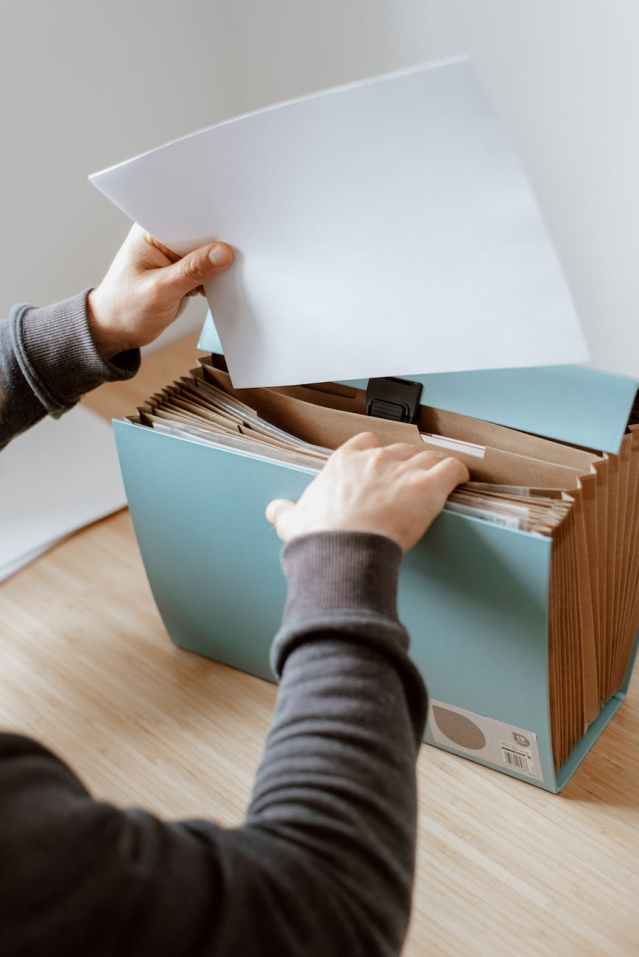
Action Files-a vertical holder can provide easy access to these working files.

Headings I use in my system:

  • Checkbook
  • Bills
  • To File
  • Ideas
  • Other folders I frequently use

More possible action file headings:

  • top priority
  • pending
  • to read

In front of this file I keep a legal pad for notes on projects, and one for idea capture.

Project Files

Project Files

Project Files

I have a separate system of project files in a wire step file holder. Since these sometimes change, I numbered them 1 – 6, but find I need a descriptive label too. In front of that is a plastic folder that holds my value statement and an outline of what I do, why I do it, and the features and benefits of each project. My project evaluation form is also here. I keep a project master list in Google Drive and print it out for my paper planner tool for the weekly review.

Reference File and Archive-a file cabinet for records that are accessed less frequently. This includes financial, medical, automobile and property information. Grab a copy of the File Headings I use for my file system.
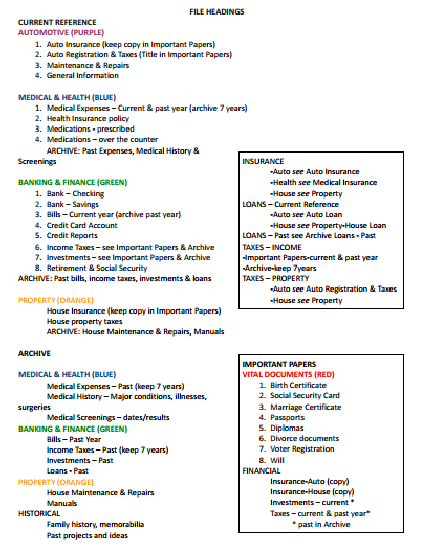
FileHeadings

Important Papers for a Grab and Go File-There are some very important files you would not want to lose in a fire. This subset of the Reference File contains vital records, insurance, income tax, and investments. See Leaving a Legacy for a free printable roadmap that details where to find all of this important information.

Household Records File-to keep information about home appliances, electronics, home maintenance and repairs.

Tickler File-a reminder system for follow-up

Computer Files-yup, these need to be organized too. See Creating Order From Chaos: 9 Great Ideas for Managing Your Computer Files from makeuseof.com, and 10 Steps to Organizing Your Computer from Organize 365.

Your mission is to decide:

  • Where do you want to keep which files?
  • How you want to organize them within the file: alphabetically? What subject headings will you use? Will you keep an index of subject headings?
  • Do you want to use colored files or tabs?
  • What kind of files will you use? How will you label them?
  • Will you date-stamp papers? How long will you keep them?

My filing system: I don’t have in and out boxes. I don’t have that many things that need follow-up, so I don’t use a tickler file. I have a four drawer file cabinet: 1) the top drawer is current reference files, 2) the second drawer is interests, 3) household records, manuals, and historical reference, and 4)work related files. I do find it helpful to keep an index that maps out what I keep where. I also use binders a lot. I have a household notebook binder, a binder for bank statements, and a separate binder with plastic pockets file where I keep paid bills.

Further Reading: Setup a Bill Paying System
Action Steps to set up files

This is one of the weekly activities for a Year of Personal Development.

Tagged with:
Posted in information management

Remind Yourself

We all could use a little help to remember things to do. We don’t want to forget important appointments or meetings, deadlines for projects, or repeating tasks.

Electronic Reminders can be set in an electronic calender or apps like Google Keep, or COL Reminder. Use the time management system you choose in a way that works for you.

Sticky Notes can be used as reminders. Here are some ideas from the book “They Shoot Managers, Don’t They?” by Terry L. Paulsen.

Remind yourself of actions you want to do with key words (like POSITIVE FEEDBACK or BETTER LISTENING) on sticky notes to put on:

  • the telephone
  • your debit card
  • the dashboard of your car
  • the refrigerator
  • the television
  • the bathroom mirror
  • your computer monitor
  • your coffee cup

Change the messages when you catch yourself not noticing them anymore. Write keywords for goals on sticky notes to place on your calendar as a reminder. At the end of the day, write one thing you did to bring yourself closer to your goals. Then move it to the next day. Follow this procedure for a month.

On page 71 of the book, it says: “There is only one way to influence others: provide the context that invites change within the other individual.”

How can we do this?

  • Ask the right questions
  • Share a visual image of the vision you see
  • Tell stories
  • Listen

You can also remind yourself to repeat a new behavior you wish to establish each time a recurring event happens. For example, breathe deeply each time you take a drink, answer the phone, use the computer mouse, look in the mirror, take a break, etc.

Visual Reminders can be a great way to remind yourself. Use a kanban board for projects, and see more ways to Keep Goals Visual and Visible and Follow Up.

Posted in information management, personal development

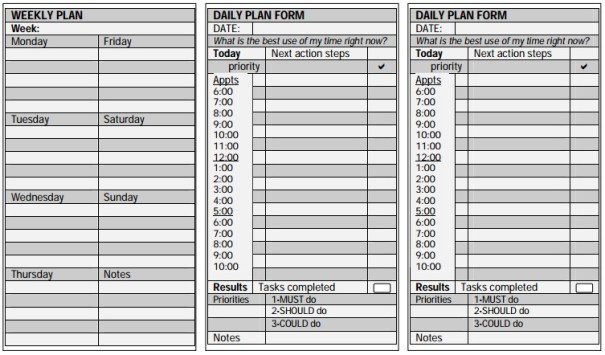
Weekly Plan

Planning is Thinking, and the ability to plan is a skill that employers want. Learn more about Daily Planning and create a Weekly Plan during the Weekly Review to see how your week will look in a week view. For each day of the week, what’s on your calendar? What repeating tasks for work and for home need to be accomplished? What meals do you plan to have? Schedule action steps for your goals and projects, and include time for personal development and maintaining relationships. Include some things to do for fun. (a free printable Planner Checklist can help.)

Weekly planning gives you a look at the big picture. You can see how busy your week is, and see quiet times where you can schedule action steps and additional tasks from your lists. It takes time and thought, which can be difficult to manage once in the middle of a hectic week. It’s important to choose a time for planning that works well for you.

Select items from:

  • Calendar: meetings, appointments, deadlines
  • Repeating tasks: work & home duties
  • Goal and project plans
  • Menus

to add to a weekly plan.

ExampleWeeklyPlan

Free printables from the Daily PlanIt

WeeklyPlan

WeeklyDailyForms

Also see the steps and questions for a Weekly Review, and a form to track Weekly & Monthly Reviews An Annual Review.

More Tools: Weekly Planner from Vertex42 | Weekly Schedule from Studentlinc (pdf) | Weekly Strategy Worksheet from GetButtonedUp | More free tools and also at Pinterest

Learn More: Video from Stephen R Covey (7:11) | Weekly Planning from The Art of Manliness

Posted in productivity

Master List

Stephanie Winston, author of “Getting Organized,” recommends keeping a master list of everything you need to do. This is a running list of things you need to remember, discuss, plan, solve, errands to run, calls to make, etc.

Low tech: notebook, index cards…

High tech: PDA, notes section of email, text file, Wiki…

Whatever you choose, it needs to be easy to add new items, and it needs to be with you at all times.

Posted in productivity

Dial it up, dial it down

http://www.escapefromcubiclenation.com/2009/06/11/how-to-know-if-a-work-challenge-is-building-or-busting-your-chops/

escapefromcubiclenation.com

Are you in the drone zone, the panic zone, or somewhere in the middle?

The drone zone-you may be moving, but you’re not productive. There’s no energy, no motivation. Dial it up: increase input-search for new ideas, design a creative environment, use color.

The panic zone-overworked, stressed…again you’re not productive. There’s no energy, no motivation. Dial it down: decrease input-deal with stress and recharge, delegate or stop some tasks, re-evaluate.

The productive zone-like Goldilock’s porridge, the input level is juuust right. Not too much, not too little. You’re in the flow, mental processes clicking away at high speed, delivering great results.

The four T’s of initiative:

Take action-when action supports the mission.

Tell others-what you are doing, what your mission is, if you have time to help.

Train-keep learning, share what you’ve learned with others.

Trust-that initiative will be recognized and rewarded.

-Ideas generated by the book “They Shoot Managers, Don’t They?” by Terry L. Paulson.

Posted in personal development

Discovery of the Day

Success From the Nest is a new addition to the list of creative blogs I read. It has great cartoons plus this great post about discovering your passion(s).

Reading Make It Great! led me to Rothacker Reviews

which led me to the Learning Journal Worksheet

which led me to the Meeting Planner Organizer Worksheet and 5x5s Worksheets at Studentl.inc.

Posted in information management

Follow-up

man opening blue briefcase with documents

Photo by Anete Lusina on Pexels.com

Follow-up systems can handle:

  • deferred actions
  • task start and due dates
  • meeting materials
  • phone call-backs
  • bill paying
  • tickets
  • tracking projects
  • delegated tasks

Methods

Simplest: Mark a calendar and hold papers in a “Pending” file-idea from Stephanie Winston.

Simple: Tickler file with two folders “this month” “next month” plus two folders “this week” and “next week.”

Less simple: A complete tickler file system with folders for each month plus 1-31 for the days of the month. Hence the name 43 Folders, an integral element of GTD (Getting Things Done) methodology.

Note: follow-up systems only work if you make a habit of checking them daily.

Posted in information management, productivity

Goal and Project Plans

A part of planning is setting goals and creating action steps for projects.

Develop Goal and Project Plans with this printable worksheet (pdf)

GoalProjectPlans

  1. WHAT is the goal or project? What wording will describe it in SMART terms? What would the result look like? What are the chances of achieving it? What actions will need to be taken? What are the benefits of accomplishing it? Will it lead to learning, growth, and improvement? Will it contribute to long-range goals?
  2. HOW could it be accomplished? What resources will be needed? Are they available? Are the benefits of achieving the goal worth the investment of resources? How difficult is it? What obstacles will possibly be encountered? How will you solve them? Do you have all the information you need? How much do you want to achieve it? Do you have the Desire? Are you willing to make the commitment of resources required? How will you reward yourself for completing steps and the entire goal or project?
  3. WHEN will it be accomplished? How long would it take? What is a realistic target date based on difficulty level and available resources?
  4. WHY do you want to achieve this goal/project?
  5. WHICH will make best use of my talents and time? Which will provide the greatest value? Which give the best results for the least investment of resources? Which fit the mission statement most closely?
  6. WHO is involved? What is the effect on others? Will it benefit everyone involved? Who will be responsible for implementation?
  7. WHERE will it happen?

See also How to Set Goals.

Tagged with: ,
Posted in goals

Day Out

As a reward for the progress I’ve been making on the garage, I had a day out of shopping. Half Price Books is one of my favorite places to go, and there I found a book called “Productivity Power” by Jim Temme. It has a neat chart comparing the similarities of projects and goals, and an interesting take on priority setting. I found a wonderful hanger for slacks at Target that holds five pairs of pants on swing arms-what an improvement over the ones I’ve been using! A stop at Office Depot for project files (a great tool for keeping papers together) led to the unexpected discovery of a desk chair that was half price too! I’ve been wanting a new one for awhile, as the one I was using was too large and just didn’t fit well. Since I spend a lot of time in it, I think it will pay off to have one that is more comfortable! It’s my favorite new productivity tool.

Posted in productivity

Time Wasters and Solutions

Problem: Interruptions
Solutions: Create blocks of time with no calls or visitors. Position your desk away from the door. Set a time limit on meetings. Cue ending (“Before I get back to this project, is there anything else I can help you with?”) Schedule a meeting at a better time. Going to the other person’s office gives you more control over leaving. Stand up to keep meetings short. Find a place where you can work uninterrupted.

Problem: Distractions
Solutions: Focus and follow through. Once a task is begun, momentum can keep you going. With each interruption time is lost. If you must leave a job in the middle, leave it at a point where it will be easy to pick up again. Concentration is the ability to focus our attention on the task at hand. Eliminate all distractions and interruptions as much as possible. Take breaks when fatigue interferes. Turn boring tasks into challenges by setting goals and determining rewards. Vary routine tasks.

Problem: The Telephone
Solutions: Batch phone calls. Call at a time you are likely to catch the person at their desk, but right before lunch or quitting time will keep it quick. Stick to the point. Set a time limit and a timer. Have simple tasks available to work on while on the phone such as clipping articles or scanning catalogs.

Problem: Taking on too many projects
Solution: Learn how to say no.

Problem: Lost papers or items
Solutions: Learn paper management and use organizational tools.

Problem: Procrastination
Solutions: Break down large projects into smaller steps. Overcome perfectionism. Overcome inertia by taking baby steps. Have routine opening moves for regular tasks. Apply self-discipline to overcome the tendency to avoid unpleasant tasks. Realize that ignored problems usually do not resolve themselves.

Problem: Waiting
Solutions: Be prepared with paper and pen and reading material. More handy items–envelopes and stamps, highlighter and sticky notes, a calculator. Make lists, review a report, plan.

Problem: Ineffective time use/crisis mode
Solutions: Plan daily, set goals, and assign priorities. Think proactively, anticipating possible problems. Allow for emergencies. Use small chunks of time. Things you can do in five minutes: make an appointment, water plants, write a short note. In ten minutes: sort mail, scan an article, straighten your desk, make a brief phone call, clean out a file.

Problem: Overwork
Solutions: Delegation. Utilize peak time. Take breaks and time for self, balancing work and play. Make conscious decisions about the best use of your time.

Problem: Re-inventing the wheel
Solutions: Use checklists for repeating tasks, an outline of the steps that need to be accomplished. Set up a tickler system for follow-up.

See also: Email management & Sticky Wiki Time Wasters

Tagged with:
Posted in productivity
eBooks

Enter your email address to follow this blog and receive notifications of new posts by email.

Archives
Blog Stats
  • 742,927 hits